
x402: A Payment Rail for Onchain Agents
x402 turns the dormant HTTP 402 status code into a stablecoin payment rail for AI agents. Here's how it works, and where Blockscout fits in.


TL;DR. With x402 AI agents can process payments independently. An agent requests a resource, gets a 402 with payment terms, signs a transfer, and retries with proof of payment attached to the header. It doesn't need an account, an API key, or a checkout page.
- Info: Governance of x402 moved to the Linux Foundation in April 2026, with 22 launch members including Google, Visa, Mastercard, Stripe, AWS, and Circle. Coinbase reported 69,000 active agents and 165 million transactions by late April 2026.
- Blockscout's agent skills run on the Pro API, the MCP Server uses the Pro API as its backend, and x402 accesses the same Pro API endpoints.
- x402 is still maturing: agents need a funded wallet, most production traffic routes through a single facilitator, and per-call billing means a stream of micro-settlements instead of one invoice.
How x402 Works
x402 is a four-step loop layered on top of an ordinary HTTP request:
- Request. A client, human or agent, sends a standard HTTP request to a protected endpoint, exactly as it would to any API.
- 402 response. If payment is required, the server replies with a 402 status and a payment-terms object: the accepted token (usually USDC), the network, the recipient address, the amount, and an expiry.
- Signature. The client signs a token-transfer authorization with its wallet, using the EIP-3009 "transfer with authorization" standard, and resends the original request with the signed payload attached in a header.
- Verify and settle. A facilitator, a service that handles onchain verification and settlement, checks the signature and confirms payment. The server then returns a 200 with the requested data.
The current spec (v2) organizes this around CAIP-2 network identifiers, allowing the same payment envelope to work whether the target chain is eip155:8453 (Base) or a Solana network. This makes x402 chain-agnostic in theory: a client can route to whichever supported chain has the lowest fees for that particular call. However, the Blockscout x402 implementation is currently only available on the Base network.
x402 is trust-minimizing: a payment payload is signed by the buyer, and any facilitator that tampers with a transaction means signature verification fails, so it can't redirect funds. The protocol itself is explicitly permissionless. Coinbase now runs the first production facilitator, but anyone can run one, and the reference implementation is Apache 2.0 licensed with TypeScript, Python, and Go SDKs plus adapters for Express, Fastify, Next.js, and Axios.
Blockscout's Path to x402
Blockscout's agent-facing infrastructure has moved in stages through 2026. The Pro API went universal on July 1, giving one key and one base URL across 120+ chains. Two open-source agent skills, web3-dev and blockscout-analysis, are installable today through the agent-skills repo and work across Claude Code, Cursor, Codex, and other skill-aware agents. The MCP Server now reads from the Pro API as its backend, so agents get the same coverage whether they call REST endpoints directly or go through MCP tools.
Using x402
Typically, a Pro API request is a key in the query string, and is billed against an account. This is the most efficient and cost effective way to use the Pro API, and includes a free version. In this example we query the address 0x on Base.
// http
GET https://api.blockscout.com/8453/api/v2/addresses/0xd8dA6BF26964aF9D7eEd9e03E53415D37aA96045?apikey=proapi_xxx
With x402 layered on top, the same endpoint can also accept a request with no key. It is charged per call instead:
// http
GET https://api.blockscout.com/8453/api/v2/addresses/0xd8dA6BF26964aF9D7eEd9e03E53415D37aA96045
HTTP/1.1 402 Payment Required
PAYMENT-REQUIRED: <base64-encoded payment terms: network eip155:8453,
  asset USDC, payTo Blockscout's address, amount, facilitator URL>
An x402-aware client library catches the response, signs an EIP-3009 transfer, authorizes with the agent's wallet, and resends the request automatically, similarly to a browser handling a redirect:
// python
from x402.clients import x402_requests
import requests

session = x402_requests(requests.Session(), account=agent_wallet)
resp = session.get(
    "https://api.blockscout.com/v2/api",
    params={"chain_id": 1, "module": "account", "action": "balance", "address": "0x..."}
)
The agent with its own funded wallet doesn't need an API key. It pays in fractions of a cent per call. A team billing centrally can keep using a key for queries, efficiency and payment management. Both paths read from the same underlying data.
Try x402 with Blockscout!
You agent will need access to a funded wallet in order to use x402. For testing it makes sense to use a burner wallet that you fund with small amounts. These example steps use Hermes agent and Forge on the Base network. You will need to fund your burner wallet with a small amount of ETH and USDC on Base to perform the following operations.
- Setup your Hermes agent. Steps to setup are located on the repo at https://github.com/NousResearch/hermes-agent. You can also ask your LLM such as Claude or OpenAPI for setup instructions and it will run you through the process. We setup with an OpenAPI key and telegram as the agent interface. You can use another agent interface or LLM that you prefer as well.
- Create a new burner wallet for testing. We use Foundry with the
cast wallet newcommand in our terminal to get a new wallet and private key. - Fund the wallet on Base. You will need both a small amount of ETH for Gas and a small amount of USDC for API calls. You can send these funds via Metamask or another wallet of your choice on the Base network by sending from your current wallet to the newly created Foundry wallet.
- Store your private key to your local agent setup. Do not share it anywhere else. For example with Hermes ->
echo 'X402_PRIVATE_KEY=0xYOUR_PRIVATE_KEY_HERE' >> ~/.hermes/.env - Tell your agent how to use the key. For example:
cat >> ~/.hermes/AGENTS.md << 'EOF'

## x402 Payments
When calling Blockscout Pro API endpoints and receiving a 402 response with a
PAYMENT-REQUIRED header, use the wallet key in $X402_PRIVATE_KEY to sign an
EIP-3009 transferWithAuthorization for the quoted USDC amount on Base, then
retry the request with the PAYMENT-SIGNATURE header.
EOF- Send a message to your agent. Ours is setup with telegram and we message "Get the balance for vitalik.eth on Base using the Blockscout Pro API"
- Note - because there is a workaround low-rpc endpoint our agent actually used the per-instance base.blockscout.com on th first try, so we didn't properly test x402.
To test x402 explicity, try this command "Call the Blockscout Pro API endpointhttps://api.blockscout.com/8453/api/v2/addresses/0xd8dA6BF26964aF9D7eEd9e03E53415D37aA96045directly — not the free per-chain endpoint. If it returns a 402, sign the payment with the wallet in $X402_PRIVATE_KEY and retry." - You should receive confirmation from your agent! For example:
`{
"success": true,
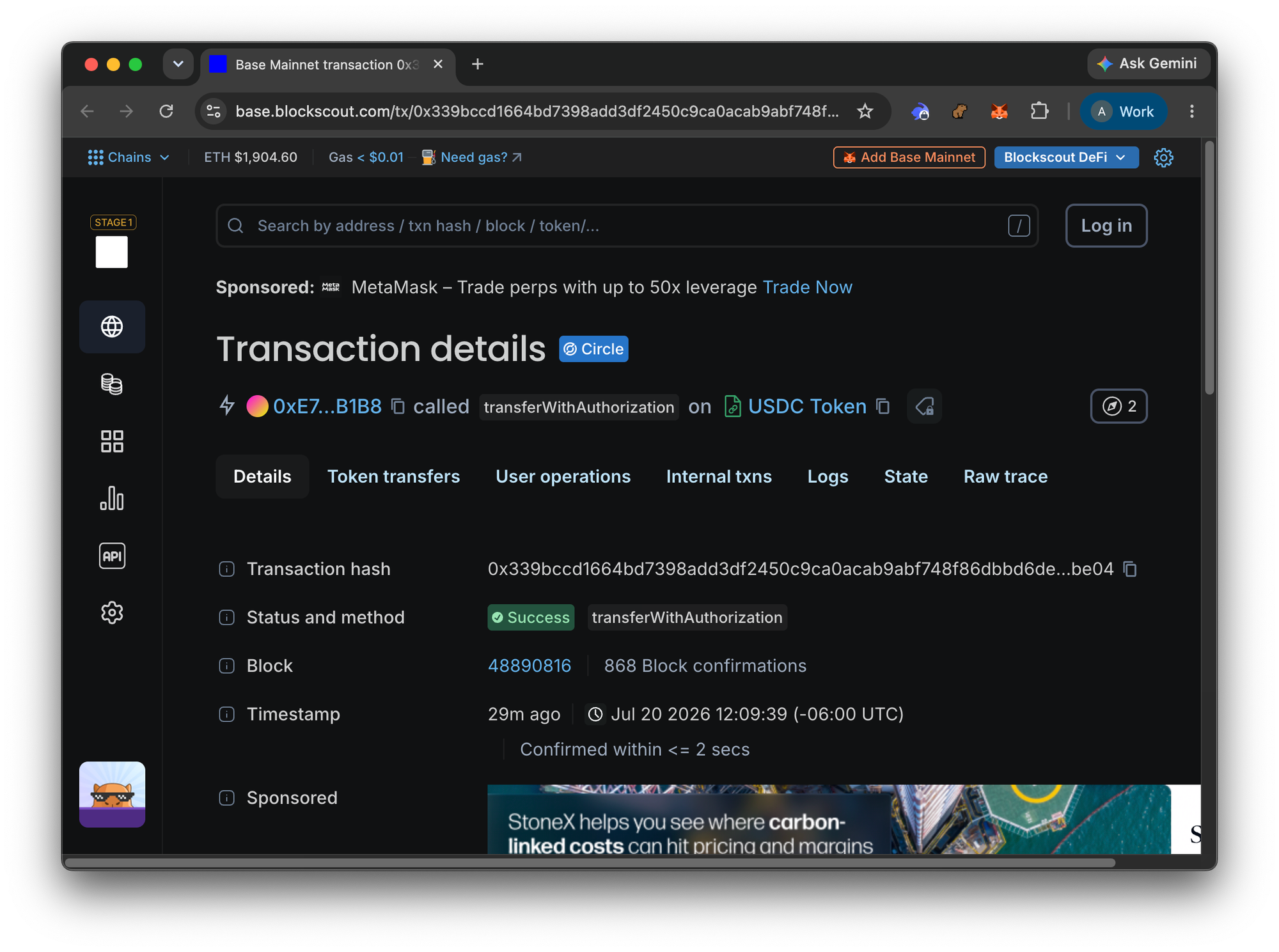
"transaction": "0x339bccd1664bd7398add3df2450c9ca0acab9abf748f86dbbd6de1b78b9bbe04",
"network": "eip155:8453",
"payer": "0xe7878baE142Ef38B557540Ae62E5118A0da4a13D"
} - Check the transaction in Blockscout to see the results. https://base.blockscout.com/tx/0x339bccd1664bd7398add3df2450c9ca0acab9abf748f86dbbd6de1b78b9bbe04
Access Blockscout's API Today
Grab a free Pro API key, install the web3-dev or blockscout-analysis skill from the agent-skills repo, and point an MCP-aware agent at 100+ EVM chains today.