
Build a Multichain Tax Calculator with the Blockscout Pro API
One Pro API key, three feeds, every EVM chain Blockscout indexes. Output a tax-grade CSV any cost-basis tool can ingest.


TL;DR. Use a single Pro API key along with three feeds for every EVM chain indexed by Blockscout. Output: a CSV that drops straight into Koinly, CoinTracker, TaxBit, or any tax processing software that takes a transaction file.
What you'll build
We'll create a script that takes a wallet address + a tax year and produces a single CSV with one row per onchain event, tagged with chainID and txHash. The same pattern works for a single user wallet, a treasury multisig, or a batch export across a portfolio of addresses.
The chain list is queried at runtime so new supported mainnets are covered automatically without any code change required.
To start, you'll need:
- A free Blockscout Pro API key (sign up at dev.blockscout.com).
- Node 18+ (for native
fetch). - A wallet address and the tax year you're filing for.
Why three feeds, not one
Tax season can be painful, especially if you are a multichain user. A typical active wallet has top-level transactions on several chains, internal value movements every time it hit a DEX or a bridge, and token transfers for every ERC-20 swap, NFT mint, and airdrop.
Most tax tools handle the high-level transactions while missing other data, like internal transactions from a router contract, token transfers triggered by a forgotten Layer 2, or airdrops on a chains you barely use.
A wallet's onchain footprint is not visible from a single endpoint. The Pro API exposes three separate feeds, and you need all of them to assemble a tax-grade record.
1. Top-level transactions
GET https://api.blockscout.com/{chain_id}/api/v2/addresses/{address}/transactions?apikey={key}The transactions a wallet sent or received directly: native ETH transfers, contract calls, gas fees. This endpoint does not include ERC-20 transfer events, even when the underlying tx was a token send. You see the call to the token contract. You don't see the transfer itself (see the third feed).
2. Internal transactions
GET https://api.blockscout.com/{chain_id}/api/v2/addresses/{address}/internal-transactions?apikey={key}Native value movements that happen inside a contract's execution. This covers txs like a Uniswap swap, a bridge deposit, a multisig payout, or a router contract forwarding ETH. These are internal transactions involving your address, even though the top-level tx may have been sent by someone else (a router, a bot, a relayer). Tax engines need these to capture every wei of native value that hits your wallet.
3. Token transfers
GET https://api.blockscout.com/{chain_id}/api/v2/addresses/{address}/token-transfers?apikey={key}Every ERC-20, ERC-721, and ERC-1155 transfer involving your address, decoded with token metadata (symbol, decimals, contract). This is where swaps, airdrops, NFT mints, and yield distributions appear.
Chain discovery
To get started, you need to know which chains to query. Two initial calls handle this (and neither require an api key).
GET https://api.blockscout.com/api/json/config
GET https://chains.blockscout.com/api/chains?chain_ids=1,10,100,...
The first returns every Blockscout supported chain ID. Gather these ids, then submit in the second query, where IDs are transformed into metadata (names, mainnet vs testnet flags). This way you can filter down to the chains that actually matter for tax reporting.
Step 1: Discover supported mainnets
Don't hardcode a chain list. Pull it from the API and filter to mainnets.
const PRO = "https://api.blockscout.com";

async function getJson(url) {
  const res = await fetch(url);
  if (!res.ok) throw new Error(`${url}: ${res.status}`);
  return res.json();
}

async function getMainnets() {
  const cfg = await getJson(`${PRO}/api/json/config`);
  const chainIds = Object.keys(cfg.chains);
  const chains = await getJson(
    `https://chains.blockscout.com/api/chains?chain_ids=${chainIds.join(",")}`
  );
  return Object.entries(chains)
    .filter(([, c]) => !c.isTestnet)
    .map(([id, c]) => ({ id, name: c.name }));
}
New supported mainnets show up automatically the next time the script runs.
Step 2: Paginate properly
Tax records are not "first 50 rows" data. You need everything. The Pro API uses keyset pagination via a next_page_params object that you echo back into the next request's query string.
async function* paginate(baseUrl) {
  const u = new URL(baseUrl);
  while (true) {
    const data = await getJson(u.toString());
    for (const item of data.items || []) yield item;
    if (!data.next_page_params || !Object.keys(data.next_page_params).length) break;
    for (const [k, v] of Object.entries(data.next_page_params)) {
      u.searchParams.set(k, String(v));
    }
  }
}
An async generator keeps memory flat even for very active wallets. The script processes events as they stream in rather than loading the full history into an array first.
Step 3: Pull all three feeds on every chain
For each mainnet, hit all three endpoints and collect the results.
async function fetchChainHistory(chainId, address) {
  const base = `${PRO}/${chainId}/api/v2/addresses/${address}`;
  const apikey = `apikey=${API_KEY}`;
  const events = [];

  for await (const tx of paginate(`${base}/transactions?${apikey}`)) {
    events.push({ chainId, feed: "tx", ...tx });
  }
  for await (const itx of paginate(`${base}/internal-transactions?${apikey}`)) {
    events.push({ chainId, feed: "internal", ...itx });
  }
  for await (const t of paginate(`${base}/token-transfers?${apikey}`)) {
    events.push({ chainId, feed: "token", ...t });
  }

  return events;
}
For a wallet active on six chains, that's eighteen paginated streams. They can run concurrently with Promise.all once you're comfortable with your rate-limit headroom.
Step 4: Filter to the tax year
Every event carries a timestamp field (ISO 8601). A tax exporter typically wants exactly one calendar year.
function inTaxYear(event, year) {
  const ts = event.timestamp || event.block_timestamp;
  if (!ts) return false;
  return new Date(ts).getUTCFullYear() === year;
}
For US fiscal-year filers or non-calendar tax periods, swap in a date-range check.
Step 5: Join, deduplicate, normalize
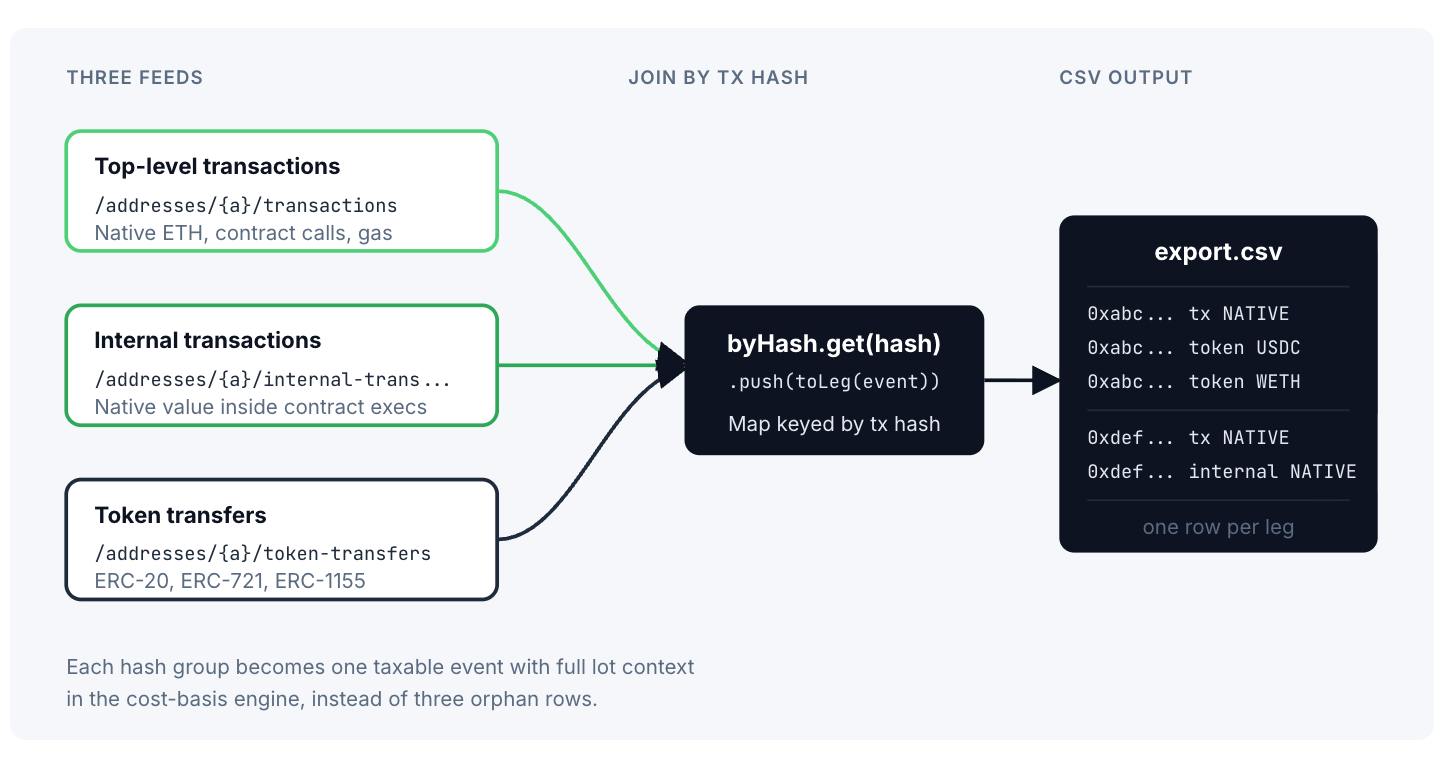
The unifying key is the transaction hash. Every event from every feed is associated with the tx that produced it.
function normalize(events) {
  const byHash = new Map();

  for (const e of events) {
    const hash = e.hash || e.transaction_hash;
    if (!hash) continue;
    if (!byHash.has(hash)) {
      byHash.set(hash, { hash, chainId: e.chainId, legs: [] });
    }
    byHash.get(hash).legs.push(toLeg(e));
  }

  return [...byHash.values()].sort(
    (a, b) => new Date(a.legs[0].timestamp) - new Date(b.legs[0].timestamp)
  );
}

function toLeg(e) {
  const base = {
    timestamp: e.timestamp || e.block_timestamp,
    from: e.from?.hash,
    to: e.to?.hash,
    feed: e.feed,
  };
  if (e.feed === "tx") {
    return { ...base, asset: "NATIVE", amount: e.value, fee: e.fee?.value };
  }
  if (e.feed === "internal") {
    return { ...base, asset: "NATIVE", amount: e.value };
  }
  if (e.feed === "token") {
    return {
      ...base,
      asset: e.token?.symbol,
      contract: e.token?.address,
      decimals: e.token?.decimals,
      amount: e.total?.value,
      type: e.token?.type,
    };
  }
}
A single Uniswap swap on this address now looks like one entry in the map with three legs: a top-level tx (with gas fee), a token transfer out (the asset you sold), and a token transfer in (the asset you bought). A cost-basis engine can read that as one taxable event with full lot context, instead of three orphan rows.
Step 6: Export to CSV
The output every cost-basis tool wants is a flat CSV with one row per leg.
function toCsv(events) {
  const rows = [["timestamp","chain","tx_hash","feed","asset","amount","from","to","fee"]];
  for (const ev of events) {
    for (const leg of ev.legs) {
      rows.push([
        leg.timestamp, ev.chainId, ev.hash, leg.feed,
        leg.asset, leg.amount, leg.from, leg.to, leg.fee || "",
      ]);
    }
  }
  return rows.map(r => r.map(csvEscape).join(",")).join("\n");
}

function csvEscape(v) {
  const s = String(v ?? "");
  return /[",\n]/.test(s) ? `"${s.replace(/"/g, '""')}"` : s;
}
Pipe to disk and you have a single file ready for upload.
What the output looks like
A few rows from a real export:
timestamp,chain,tx_hash,feed,asset,amount,from,to,fee
2025-03-14T18:42:11Z,1,0xabc...,tx,NATIVE,0,0xUser,0xRouter,213000000000000
2025-03-14T18:42:11Z,1,0xabc...,token,USDC,500000000,0xUser,0xRouter,
2025-03-14T18:42:11Z,1,0xabc...,token,WETH,182000000000000000,0xRouter,0xUser,
2025-04-02T09:15:33Z,8453,0xdef...,tx,NATIVE,50000000000000000,0xUser,0xBridge,84000000000000
2025-04-02T09:15:33Z,8453,0xdef...,internal,NATIVE,50000000000000000,0xBridge,0xUserL2,
Who this is for
For individual users, this is the export step that lets you actually finish your taxes without manually reconciling six explorer tabs. Run the script, upload the CSV, and receive the output.
For DAOs and treasury teams, point the script at every multisig and operating wallet. The same join-by-hash logic gives you a consolidated movement log for the year, ready for audit prep or grants reporting.
For protocols issuing rewards or airdrops, point it at the distribution contract's recipient set. You get a clean record of every claim across every chain, the format your finance team or your recipients will need.
For tax-tool vendors, this is the integration that lets you offer multichain coverage without providing your own indexer for every chain. You only need a single API key and receive the same response for all supported chains.
Extensions
Useful next steps:
Historical USD pricing. Cost basis requires the USD value of each asset at the moment of the transaction, not today's price. The Pro API returns current rates on the /tokens endpoint, but for historical pricing you'll need to add an external feed (CoinGecko, Pyth, your own oracle) keyed off the block timestamp on each row. The CSV format above leaves a natural column for this.
Scam-token filtering. Token endpoints filter known scam airdrops by default. For tax purposes that's usually correct: you don't want to report a phishing token as a taxable receipt. If you need the unfiltered list for a dispute or audit, pass the show-scam-tokens header on the token-transfer call and add your own scoring layer using the circulating_market_cap, exchange_rate, and holders_count fields.
NFT-specific treatment. ERC-721 and ERC-1155 transfers come through the same endpoint as ERC-20 with a token.type field. Most tax software wants NFTs as separate line items with cost basis tracked per token ID. Branch the CSV writer on token.type and emit NFT rows with token_id in their own column.
Multi-wallet entity rollup. A user, a DAO, or a fund usually controls more than one address. Wrap the script in a loop over a list of addresses and tag each row with a wallet label. The output is still one CSV per entity, with an extra column.
Bridge matching. When the same wallet bridges between chains, you can pair the source-chain deposit with the destination-chain mint by matching values within a time window. This converts what would otherwise look like two separate taxable events into a non-taxable transfer between your own accounts.
Multichain Service for sparse wallets. If most users in your batch only have activity on two or three chains, the multichain/api/v1/clusters/multichain/search:quick endpoint will tell you which chains an address has appeared on. Querying only the active ones cuts your request count by 3-5x on a typical wallet.
A note on CORS The Blockscout Pro API doesn't permit browser-origin requests by default. A tax exporter is almost always a server-side or local script (Node, Python, a CI job), so this rarely matters. If you do want to ship a browser UI on top of this script, route requests through a server-side proxy or a serverless function (Cloudflare Workers, Vercel Edge, AWS Lambda).
Multichain by default
Every endpoint in this build is the same URL with a different chain ID in the path. Since the chain registry is fetched at runtime, adding a chain to your tax export is built into the process.
Get started
Sign up for a Pro API key at dev.blockscout.com. The full reference for the endpoints used here lives in the Blockscout tax calculator docs.
Ready to ship your own exporter?
Grab a free Pro API key and run the script against your own address today. The free tier covers most personal tax-export workloads.