
Onion Mode: Explore Ethereum Privately Over Tor
Blockscout's Ethereum explorer now runs as a Tor-native onion service. Inspect the chain from anywhere — no location, no trail, no account.


TL;DR.
- Blockscout's Ethereum explorer (eth.blockscout.com) also runs as a Tor-native onion service. It has been live on Ethereum mainnet since February 2026.
- Open it in Tor Browser, tap the .onion available badge, and read the chain through Tor with no location revealed and no identifying traces left behind.
- The Tor build is purposefully stripped down. No tracking, no account features, just a simple private block explorer available for use.
Read the chain without leaving a trace
The Tor-native onion service for Blockscout is the Ethereum explorer you already use, served directly over the Tor network. It was deployed on the Ethereum mainnet instance (eth.blockscout.com) in February 2026 and has been available ever since.
Ethereum is a public blockchain, and the paths to view data typically contain public tracking measures (cookies, ads, accounts, etc). When you load a block explorer over the normal web, your IP address, approximate location, and behavioral trail can be accessed and potentially tied back to the addresses you searched. The data on-chain is transparent by design, but the act of looking at it shouldn't expose you if you prefer to remain anonymous.
How Tor protects the lookup
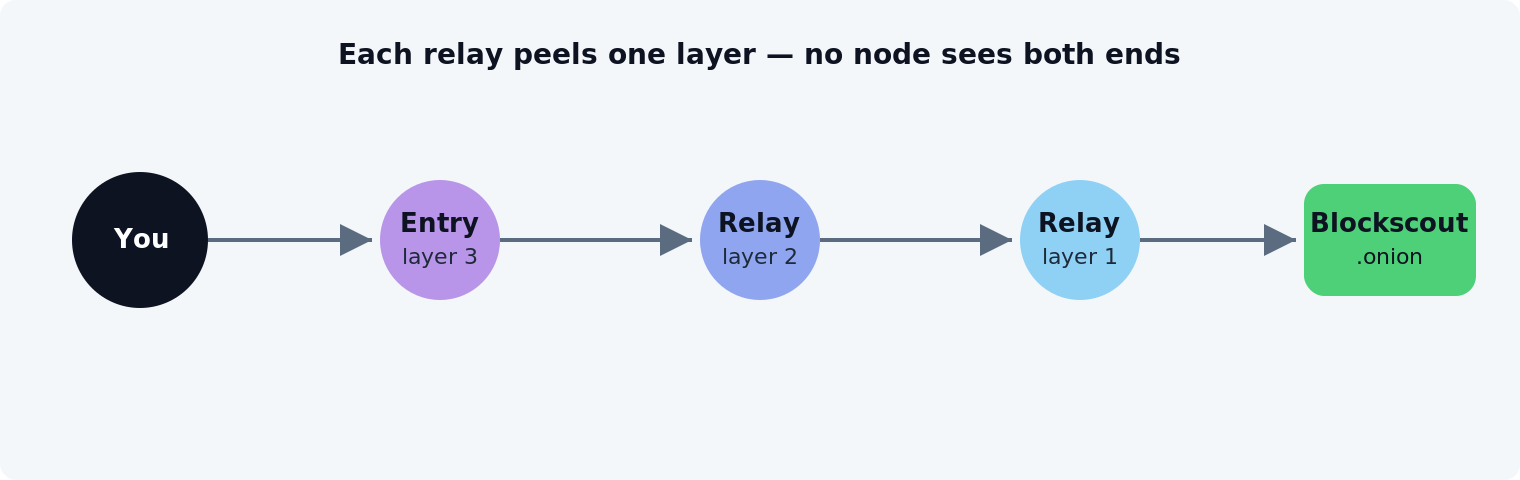
Tor, short for The Onion Router, is free, open-source software that anonymizes traffic by routing it through three volunteer-run relays and wrapping it in one layer of encryption per hop. Each relay peels off exactly one layer, learns only where to pass the traffic next, and nothing more.
No single relay sees both the source and the destination. The entry relay knows who you are but not where you're going; the exit relay knows the destination but not who asked. This separation makes the path anonymous for both the reader and the site.
A Tor-native onion service goes even further: traffic to a .onion address, a 56-character v3 hostname, never leaves the Tor network at all, so there's no exit relay and no clear-web hop to observe.
Turn it on in three steps
Switching to the private version of Blockscout takes three steps and needs no additional setup. The private version is available via the Onion-Location service, a standard HTTP response header that turns on the .onion available badge automatically when Blockscout is accessed on Tor.
- Open eth.blockscout.com in Tor Browser.
- A purple .onion available button appears in the address bar.
- Click the button and the page reloads on the Tor-native version. You're browsing Ethereum privately.
The interface is the explorer you already know minus account info and ads. You can search a transaction, read a verified contract, and trace value through an address.
Differences on Tor
The Tor build of Blockscout is deliberately read-only: it strips out every feature that might leak someone's identity, leaving just the chain data. Privacy isn't only about the network path. An explorer can leak info through its own features too. So the Tor build eliminates three classes of functionality:
- No behavioral measurement. No engagement tracking, no analytics tuned to optimize what you click.
- No persistent identity. No account layer, no social signals, nothing that ties one session to the next.
- No execution surfaces. No wallet connect, no transaction pathways. The Tor build is for reading the chain, not acting on it.
The result is a lean, read-only window into Ethereum. Built for observation and verification, not interaction.
A first step
This is the first onion service Blockscout has shipped, and more instances may follow. Usage isn't tracked, so there's no way to measure adoption. If you want the deeper background on why on-chain privacy is layered, read our earlier dispatch, Peeling the Onion.
Open the explorer in Tor Browser, tap the .onion badge, and read the chain without leaving a trail.
Explore Ethereum privately
Open the explorer in Tor Browser, tap the .onion badge, and read the chain without leaving a trail.
Open Blockscout in Tor Browser