
You Forgot the Dapp, But Your Wallet Didn’t
Token approvals don’t expire. Learn why unlimited approvals are risky, how to check them on a block explorer, and how to revoke them using Revokescout.


In recent weeks, multiple wallets have been drained without phishing links, leaked private keys, or suspicious signatures. In several cases, attackers didn’t need users to sign anything at all.
Instead, they exploited something far more common and far more overlooked: old token approvals.
Security researchers regularly flag incidents where attackers take advantage of lingering approvals left behind after users interacted with DeFi apps, NFT marketplaces, or experimental protocols. Once an approval is in place, it can remain active indefinitely, silently exposing your wallet to risk.
In this guide, we’ll break down how token approvals work, why unlimited approvals are dangerous, how to inspect them using a block explorer, and how to clean up your wallet using Revokescout, now available directly inside Blockscout explorers across multiple chains.
What Are Token Approvals?
When you interact with most DeFi apps, you’ll see a prompt asking you to “approve” a token before using it.
This approval is a smart contract permission that allows another contract (the spender) to move a specific token from your wallet on your behalf.
Under the hood, this comes from the ERC-20 standard function: approve(spender, amount)
In plain terms:
- You are not sending tokens
- You are granting permission for a contract to spend tokens later
- That permission stays active until you revoke it or change it
You might approve a token once to swap it, mint an NFT, or try a protocol and then forget about it. But that permission can remain active long after you stop using the app.
 0xScout
Unlimited Approvals: Convenience vs Risk
Many dapps request unlimited approvals by default to simplify the user experience. By approving the maximum possible amount upfront (uint256 max), users avoid having to submit a new approval transaction every time they interact with the app, reducing friction and repeated gas costs.
The trade-off is that this gives the approved contract permission to move any amount of that token from the wallet at any time. While this feels convenient from a UX standpoint, it introduces real security risk.
If the approved contract is ever exploited, maliciously upgraded, or was never trustworthy to begin with, an attacker can drain the approved tokens without requiring any additional signatures from you.
The Silent Drain
This is where many users get caught off guard.
An attacker doesn’t need your private key, signatures obtained through clever phishing tricks, or any other method of access to your wallet. They only need a vulnerable or malicious contract, and an existing approval.
Once the contract has permission, it can call transferFrom() and move tokens directly out of your wallet.
This is why many reported wallet drains show no suspicious outgoing transactions initiated by the user. The approval already existed.
Reading Token Approvals Using a Block Explorer
To understand your exposure, it helps to see how approvals appear onchain.
When a token approval happens, it emits an approval event. You can view this clearly using a block explorer like Blockscout.

What to Look For in an Approval Transaction:
Using Blockscout, you can inspect an Approval event by opening a transaction hash where an approval occurred and then navigating to Logs to view the exactly which contract was granted access (and for how much).
On the Logs tab. You’ll see an event labeled: Approval(address indexed owner, address indexed spender, uint256 value)
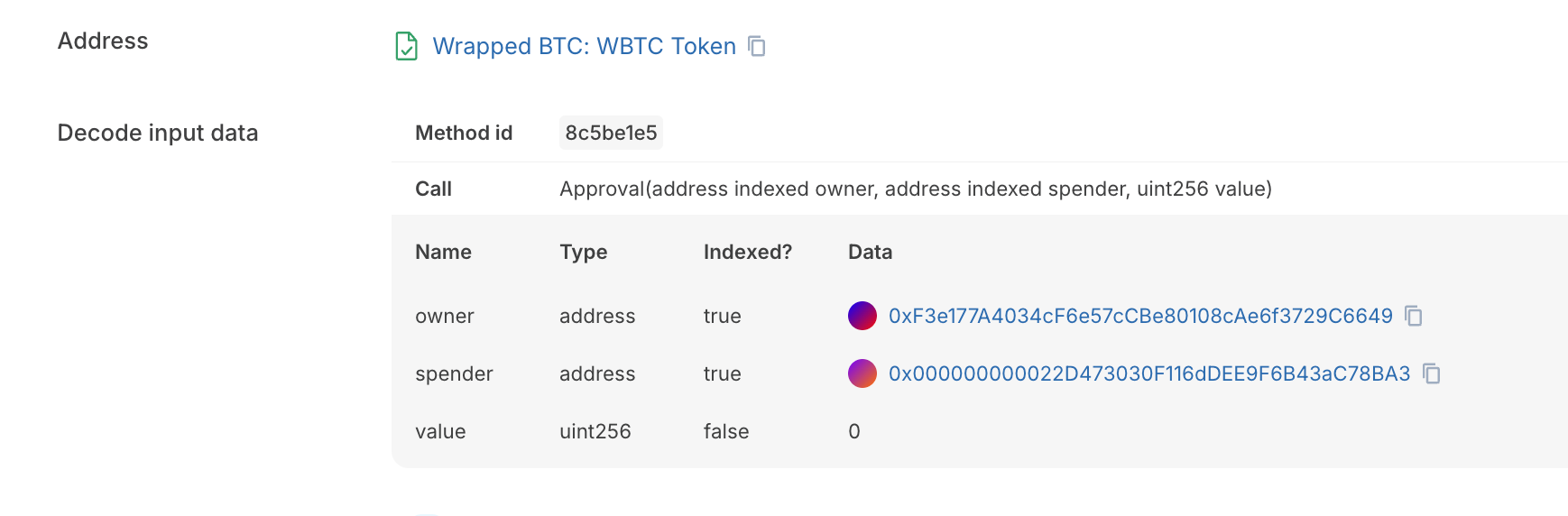
Here’s what each field means in this transaction:
- Owner: the wallet that granted permission
- Spender: the smart contract allowed to spend the tokens
- Value: the amount that has been approved
If you’re new to reading transactions, Blockscout’s guides on reading blockchain transactions and smart contract analysis are a great place to start.
 0xScout
Auditing Your Own Exposure: The Hidden Risk
Here’s the problem: most users don’t remember what they’ve approved.
Over time, wallets accumulate approvals from:
- NFT marketplaces
- DeFi protocols tried once
- Test or experimental apps
- Old versions of dapps you no longer use
Manually checking every token and contract across multiple chains is tedious and error-prone. As a result, many users unknowingly leave dozens of unlimited approvals active.
This is where wallet hygiene becomes critical.
Remember Revokescout, And You'll Never Forget Approvals
Revokescout makes auditing and revoking token approvals simple and accessible, directly inside Blockscout explorers. It works across multiple networks, including Ethereum, Base, Optimism, Arbitrum, Soneium, Ink, Celo, Rootstock, and more.
From a single dashboard, you can see which approvals are still active, how much value is at risk, and take action immediately by revoking approvals.
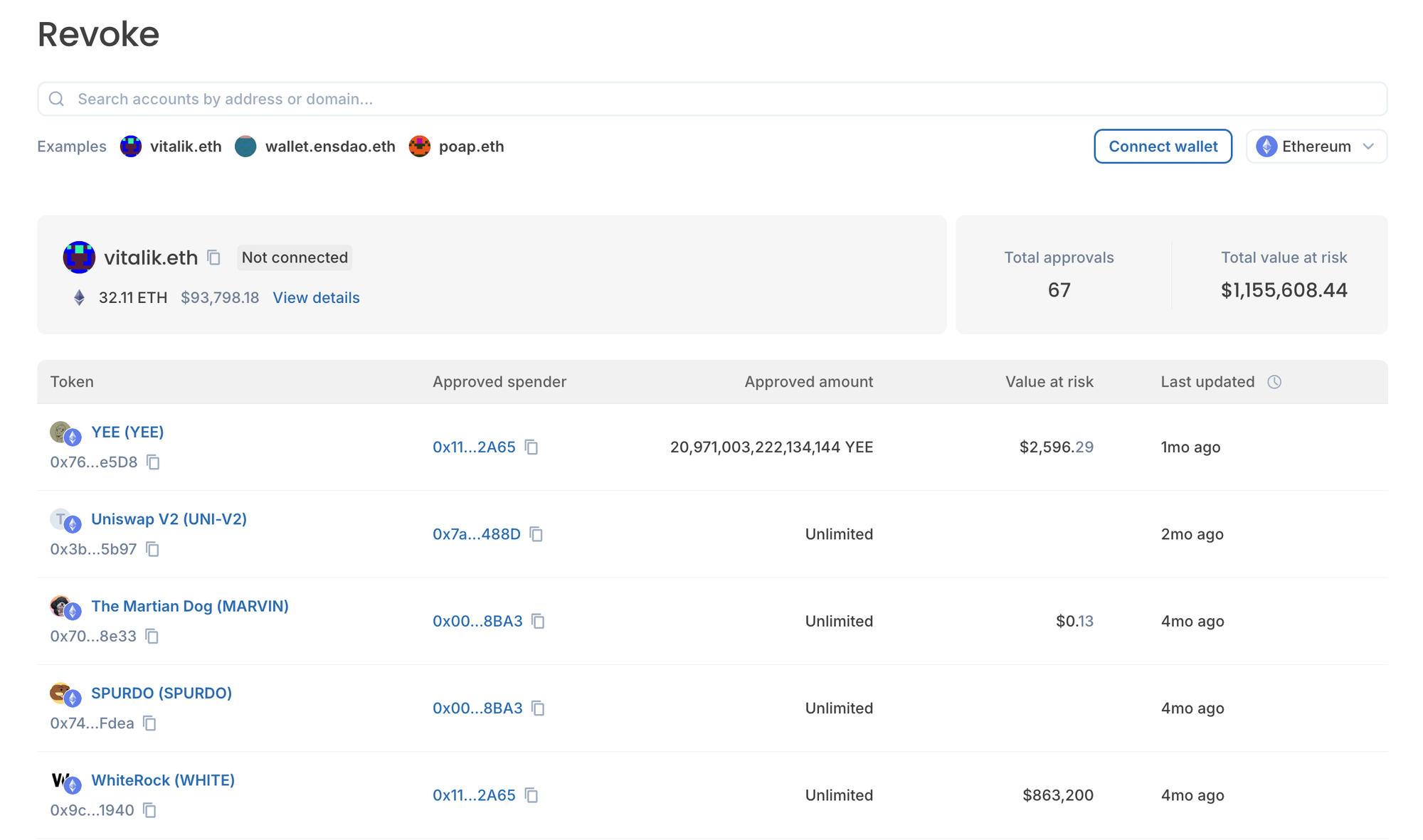
Quick Guide For Managing Token Approvals With Revokescout
- Open Revokescout from Essential Dapps
- Select your chain
- Connect your wallet
- View all active token approvals in one dashboard
- Identify unlimited or suspicious permissions
- Click Revoke on approvals you no longer need
- Confirm the transaction in your wallet
That’s it. Once revoked, the contract no longer has permission to move your tokens.
When Should You Revoke Approvals?
Any time is a good time, but especially:
- After completing trades on NFT marketplaces
- When you stop using a DeFi protocol
- If you see approvals for contracts you don’t recognize
Security as a Habit (SAAH)
Token approvals are a necessary part of interacting with onchain apps, but they shouldn’t be ignored.
Unlimited approvals are convenient, but convenience comes with trade-offs. The good news is that with the right tools, managing your exposure is straightforward.
Revokescout turns approval cleanup into a simple, repeatable habit. Right where you already explore the chain.
🛡️ Security always comes first
 Joe
Joe