
How to Recover Funds When a Dapp Website Is Down
Dapp website down? Your funds are not lost. Learn how to withdraw and access funds directly from smart contracts using a block explorer, with a real Aave example.

Smart Contract + Block Explorer = Onchain Magic
If a dapp’s website goes down, it may seem like your funds are suddenly stuck.
But here is the important part up front: your funds are not frozen, broken, or lost just because the website you normally use is unavailable.
The smart contract is still running. Stakes are still staking. Yield is still yielding.
The real problem only appears when you want to do something new, like withdraw funds, claim rewards, or change a position. That is when the missing interface becomes an issue.
This guide shows how to use a block explorer as a fallback interface to access a dapp directly, using a real withdrawal from Aave Pool V3 as an example. After that, we will step back and explain why this works, what smart contracts really are, and how wallets and explorers fit together.
Smart Contracts Do Not Depend on Websites
For the purposes of this article, decentralized applications have two main parts: a frontend, usually a website, and a smart contract deployed on the blockchain.
When the frontend goes down, this does not need to affect the smart contract at all. What disappears is the interface, not the system itself.
There is no spoon.
This is where a block explorer becomes more than a way to verify or inspect your transactions, it becomes a way to interact with the protocol directly.
Using a Block Explorer as a Fallback UI for Dapps
Aave Pool V3 example
Let’s look at a real, production smart contract used by millions of users: Aave Pool V3.
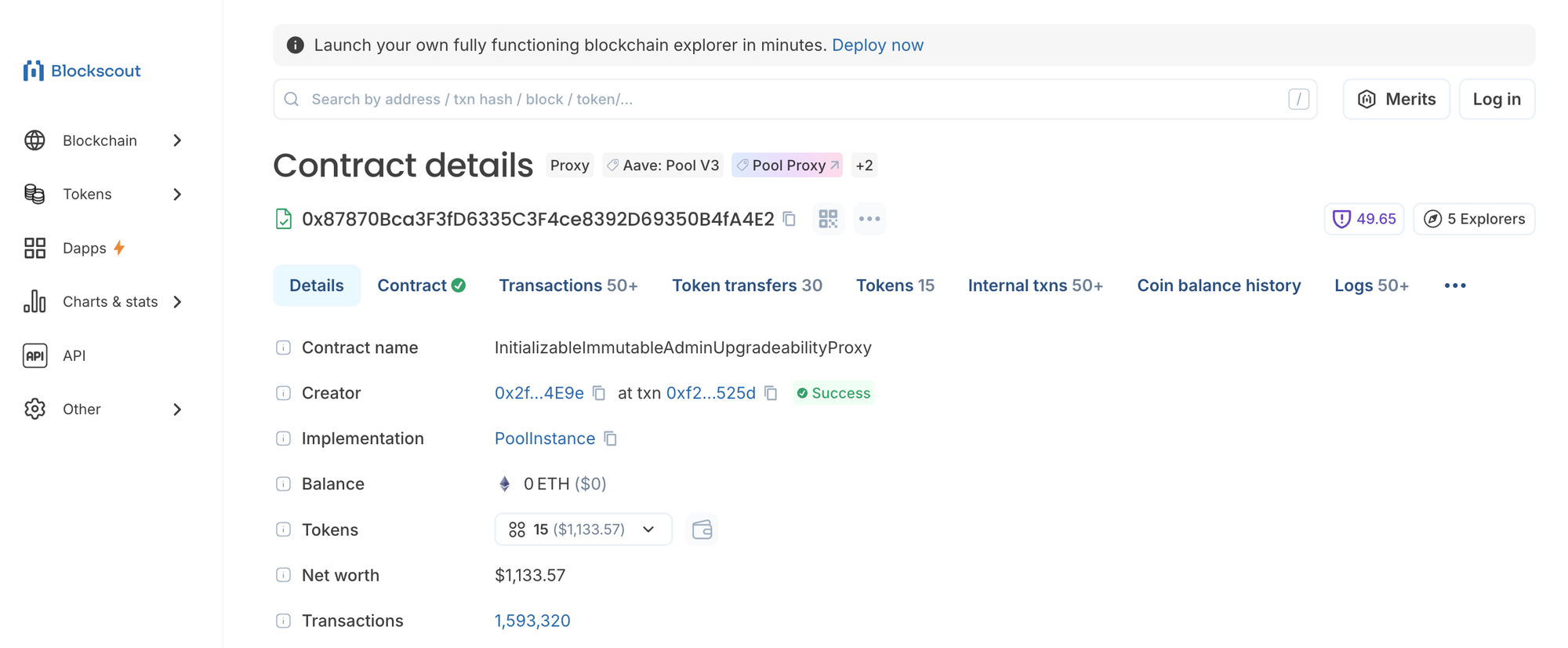
On this page, you can inspect a wide range of information: public tags, deployment details, interactions from other externally owned accounts as transactions, and third-party widgets curated by Blockscout such as Webacy, TrustBlock, and SmartMuv. Each of these reveals a different aspect of how the contract is used and monitored onchain.
More importantly, this page is also a direct window into the smart contract itself. It is the same contract the Aave website normally interacts with, and you can interact with it yourself using only the block explorer UI.
Under the Contract tab, you will find the Read/Write section. This is what we will use to withdraw funds without relying on the Aave website.
Read vs Write: Understanding the Explorer Interface
Before doing anything, it is important to understand the difference between reading from a contract and writing to it.
The Read tab lets you query the contract’s current state. Reading requires no wallet connection, costs no gas, and carries no risk of changing anything onchain. For a protocol like Aave, this means you can inspect reserve data, configuration values, contract addresses, and overall system state.
The Write tab is where actions happen. Writing requires a wallet connection, creates a real transaction, and changes onchain state. This is what the Aave website and your wallet normally use behind the scenes when you deposit, borrow, or withdraw. The explorer simply exposes those same functions directly.
This distinction is critical. Reading is always safe. Writing requires understanding exactly what you are signing.
Step by Step: Withdrawing Funds From a Dapp Using the Block Explorer
This walkthrough shows how to withdraw funds from a dapp like Aave Pool V3 directly through the block explorer, using the same smart contract logic the Aave website normally calls.
Step 1: Open the Dapp Contract Page
For our example, we'll start at the verified Aave Pool V3 address on Ethereum
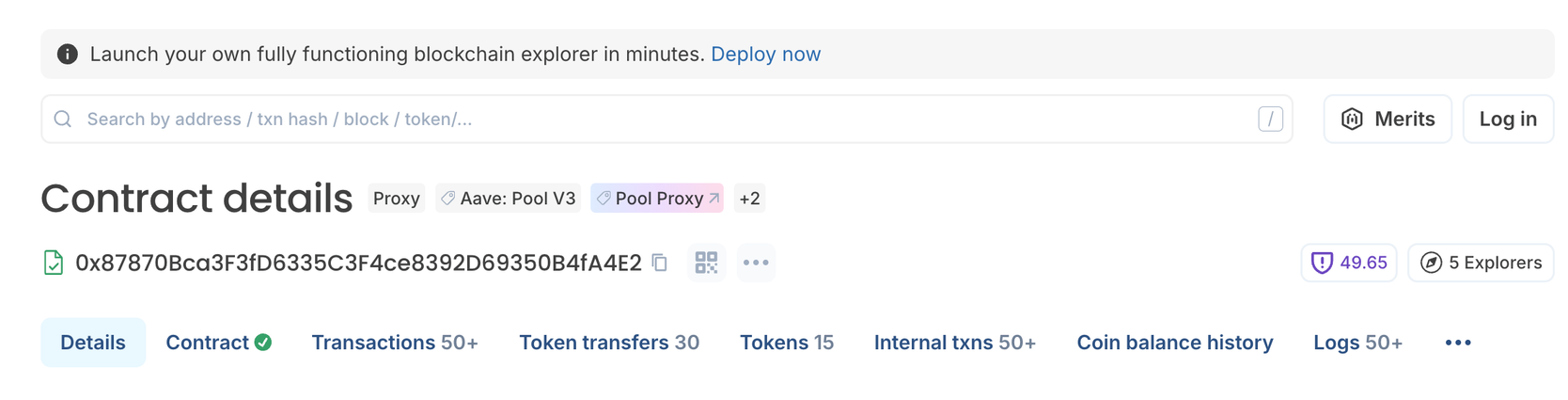
At the top, you will see that this contract is labeled Aave: Pool V3 and Pool Proxy. So we know we're in the right place just from the tags. But you can check this against your own EOA transaction history for actual verification.
The proxy tags simple highlight that Aave uses a proxy contract, which means the address users interact with remains the same while the underlying logic can be upgraded over time. From a user perspective, this is normal and expected.
Step 2: Open the “Read/Write Proxy” Tab
Navigate to the Contract section, select Read/Write proxy, and Connect your wallet if haven't already.
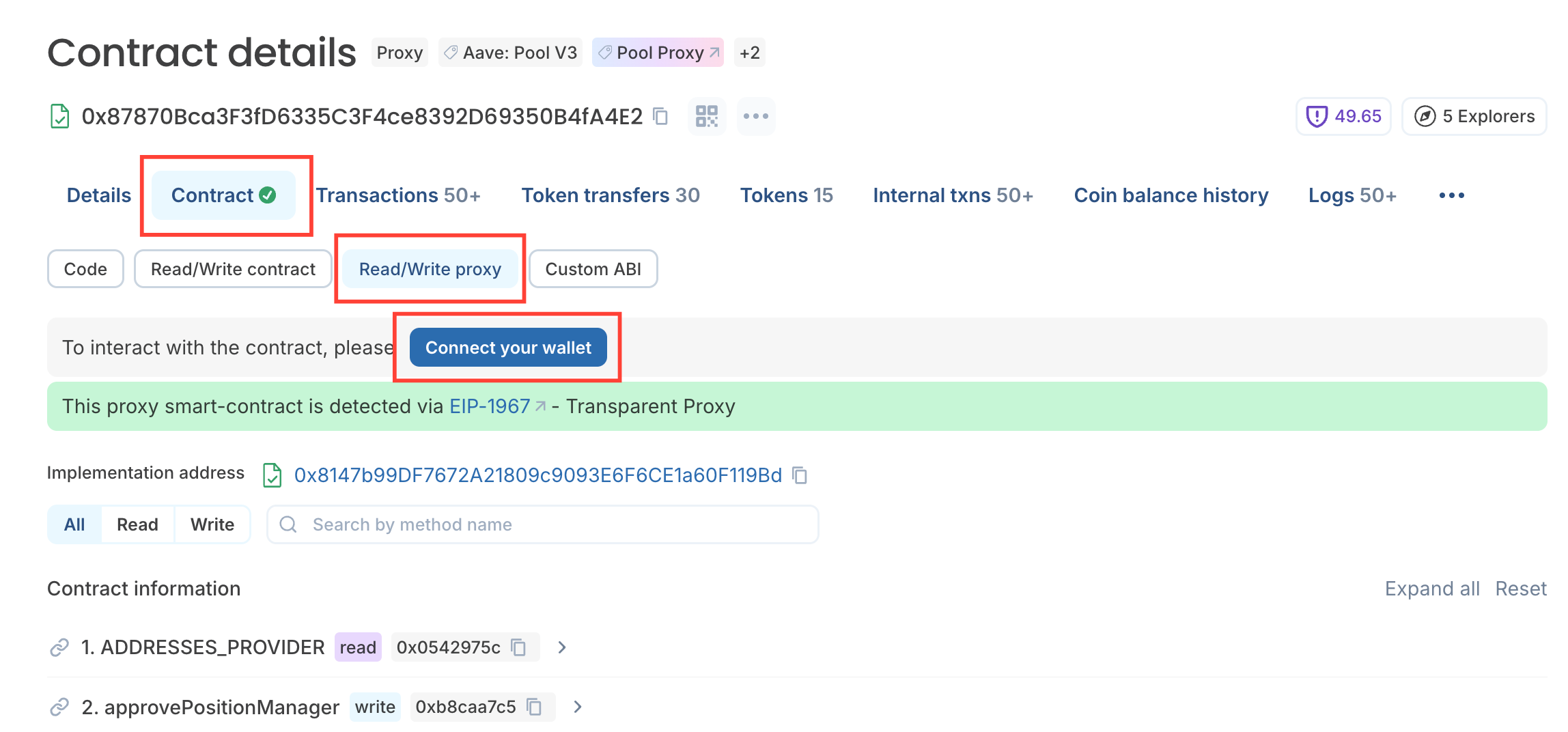
Sidebar: because Aave uses a proxy pattern, user-facing functions like withdraw appear under the proxy interface rather than the base contract tab. Blockscout detects this automatically and clearly labels the contract as a transparent proxy. You do not need to understand proxies to proceed, you just need to use the correct tab.
Step 3: Confirm the Implementation Is Detected
At the top of the proxy interface, you will see a message indicating that the proxy has been detected via EIP-1967, along with an implementation address.
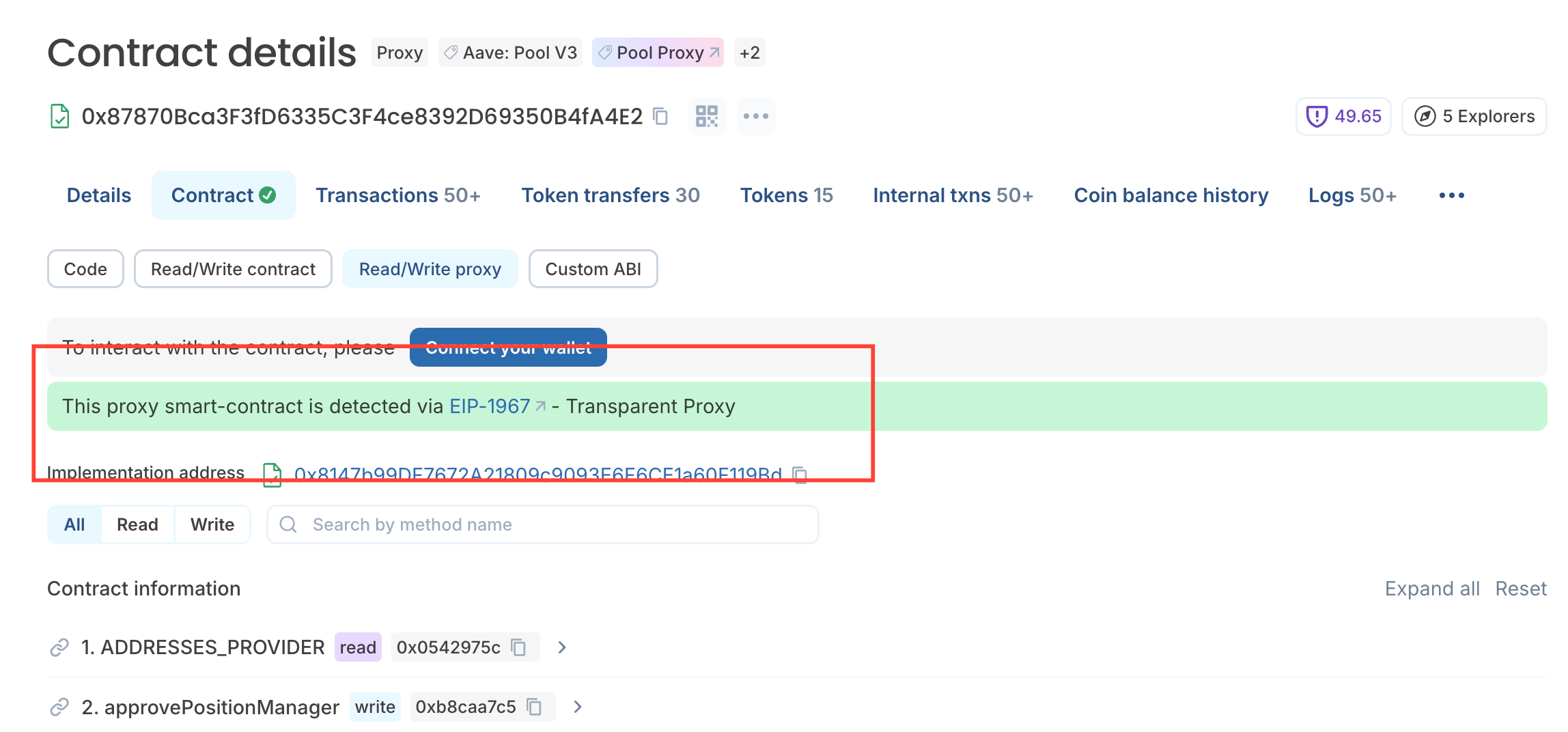
This confirms that the proxy is correctly identified, the underlying logic is known, and user-facing functions are available for interaction. This is exactly what you want to see before proceeding.
Step 4: Switch to “Write” and Search for Withdraw
In the Read/Write proxy tab, you can find a long list of all types of functions that you can execute from the block explorer.
Select Write, then use the search field to look for withdraw.
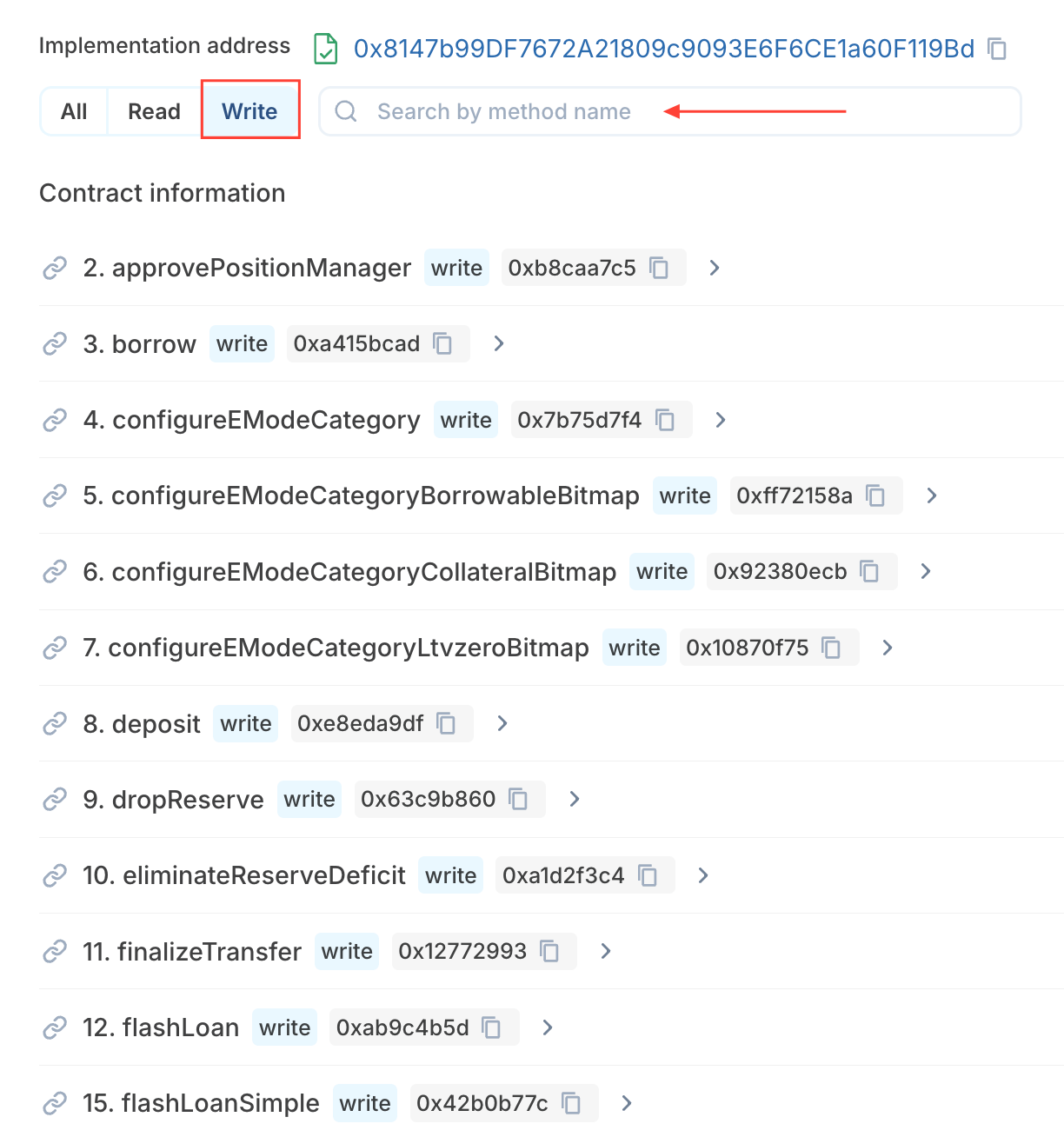
This is the same function the Aave frontend calls when you click “Withdraw”.
Step 5: Understand the Withdraw Parameters
Before entering anything, take a moment to understand what each field represents.
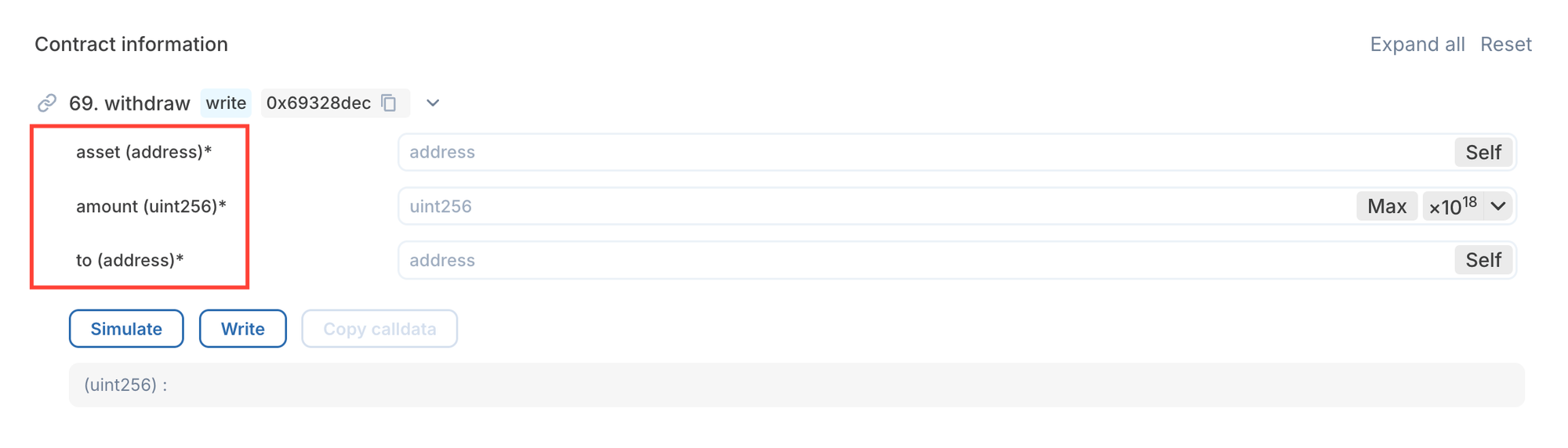
The asset parameter is the contract address of the token you want to withdraw. WETH and USDC, for example, each have their own ERC-20 contract address. You must enter the correct token address for this chain. You can find token addresses in the Tokens Section of the explorer or by using the search bar to look up the token by name and navigating from there.
The amount parameter is expressed in the token’s base units, and it's not a very simple human-readable number. Tokens use decimals. For WETH, 1 WETH equals 1,000,000,000,000,000,000 units. You will also notice a Max option, which uses the maximum uint256 value and tells the contract to withdraw the full available balance for that asset. Only use this if you understand what it does.
The to parameter is the address that will receive the withdrawn funds. In most cases, this will be your own wallet address. Blockscout conveniently allows you to auto-fill this field using Self.
Step 6: Simulate the Transaction
Before sending anything onchain, click Simulate.
Simulation allows you to verify that the call will succeed, catch obvious configuration errors, and avoid paying gas for a reverted transaction. Simulation does not move funds and does not change state.
Step 7: Submit the Transaction
If the simulation succeeds and the parameters look correct, click Write, confirm the transaction in your wallet, and wait for onchain confirmation.
At this point, the withdrawal is executed by the smart contract itself. But mostly by you, the newest Onchain Magician on the team.
What Just Happened
You interacted directly with the Aave Pool smart contract through its proxy. The website was not required, the protocol did not pause, and your funds were always accessible.

The block explorer simply exposed the same contract interface that the frontend normally hides. This is not a loophole or an emergency trick. It is how decentralized applications are designed to work.
Contract Function Reverted?
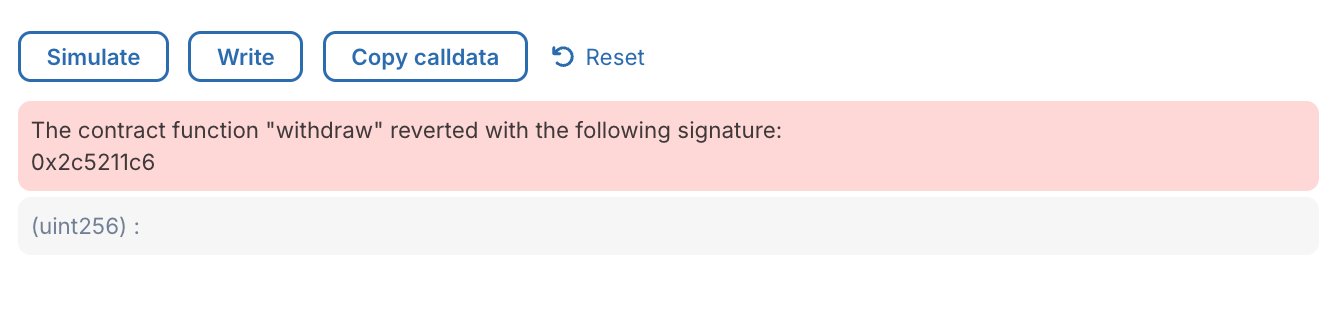
When you simulate a transaction and see an error code or a short revert string, it usually tells you only one thing for certain: something went wrong. Figuring out what went wrong is not always straightforward.
The failure could mean that you do not have permission to move that token or that amount. It could mean the token does not exist, the contract is paused, or that a required approval is missing. It can also be as simple as entering the wrong data in the wrong field. From the error code alone, there is often not enough information to know which condition failed.
This is because there is no universal list of smart contract error codes. Revert reasons depend entirely on how each contract is written. Some contracts expose human-readable error messages, while others intentionally omit them to reduce gas costs or enforce stricter execution rules.
Block explorers will decode errors when possible, but when you see only a raw error signature, it usually means the contract did not expose a readable reason. In those cases, the most reliable way to understand what happened is to reason about the contract’s rules.
Standard references like the ERC-20 and ERC-721 specifications, along with widely used libraries such as OpenZeppelin, are often the best place to start. They document the expected behavior and input data for common functions and the conditions under which they fail. When a contract is verified, inspecting its source code directly can also clarify what inputs are required and which checks are being enforced.
What Is a Smart Contract, Really?
Now that you have seen smart contracts in action, it is worth stepping back and explaining what is actually happening under the hood.
A smart contract is code deployed to a blockchain. Once deployed, it lives at a specific onchain address and is executed by the network itself. If the conditions defined in the code are met, the contract executes exactly as written.
This code is effectively immutable. While some contracts, like Aave Pool V3, use proxy patterns to allow logic upgrades, the rules governing how funds move and under what conditions they can be accessed are enforced onchain. The blockchain does not care who calls the contract or from where. It only checks whether the call is valid.
This is why decentralized applications can survive frontend outages. The logic does not live on the website. The website is just one interface among many that can talk to the contract.
A Real Withdrawal, Executed Onchain
To make this concrete, let’s look again at a withdrawal transaction from the Aave Pool:
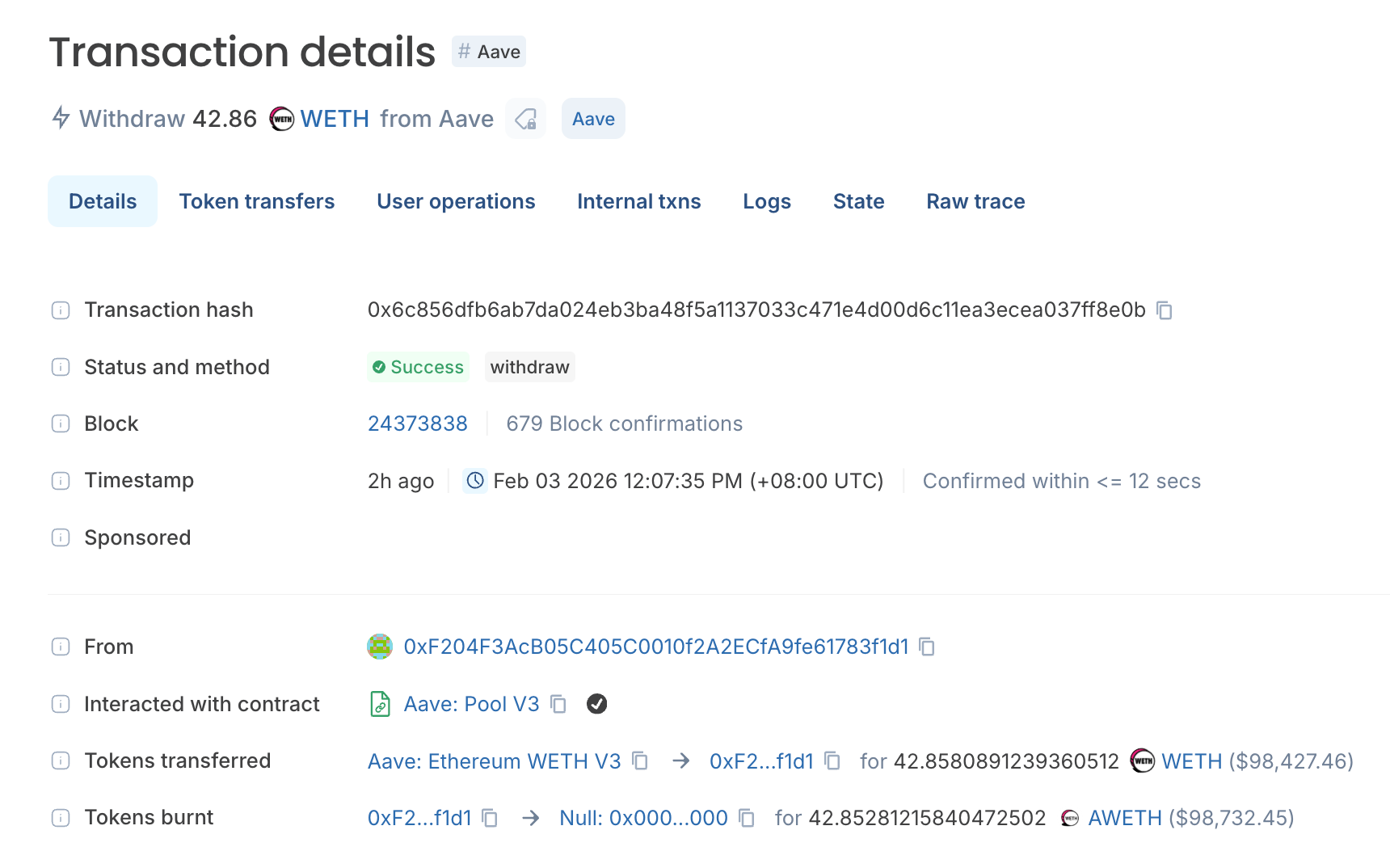
From the user’s perspective, this likely appeared as a simple action in a wallet or dapp interface, something like “Withdraw WETH”. The complexity was intentionally hidden.
On the block explorer, you can see what actually happened. A user initiated a transaction from their wallet, which called the Aave Pool V3 smart contract. The withdraw function was executed with clearly defined parameters: the asset address identified WETH, the amount specified how much to withdraw, and the recipient address defined where the funds should be sent.
Once submitted, the transaction was validated and executed by the Ethereum network. The contract checked that the user had sufficient balance and that the withdrawal was allowed. When those conditions were met, the funds were released.
This exact same process occurs whether the transaction originates from the Aave website, a wallet interface, or directly from a block explorer. The smart contract does not know or care which interface you used. Interfaces are interchangeable.
The contract is the source of truth.
Decentralization Is What You Are Signing Up For
When you approve a transaction in your wallet, you are not approving a website. You are approving an interaction with a smart contract.
In the case of Aave Pool V3, that contract exists for a very specific purpose within the broader Aave protocol: managing deposits, borrows, repayments, and withdrawals. Other parts of a dapp may use additional contracts, each with their own narrowly defined role.
Tokens are smart contracts. NFTs are smart contracts. Governance systems are smart contracts. Most onchain activity ultimately resolves to contract code.
This is also why many interactions require permissions. Before a dapp can move your tokens on your behalf, you must explicitly approve that behavior. You are granting a smart contract permission to execute certain operations using your assets. This is a powerful feature and one that deserves careful attention. If you want to go deeper, we have a dedicated guide on token approvals and how to manage them safely.
 0xScout
Understanding that approvals are contract-level permissions, not website permissions, is a key part of using DeFi responsibly.
Wallets vs Block Explorers
Wallets and block explorers are designed for different jobs.
Wallets are optimized for speed and simplicity. They abstract away complexity, bundle multiple contract calls into a single action, and focus on the most common user flows. This is why they feel approachable and why most users interact with smart contracts through wallets and dapps.
Block explorers are optimized for transparency. They expose raw contract logic, show exactly which functions are being called, and allow users to inspect state, parameters, and execution details directly onchain.
When everything is working smoothly, wallets and dapps are convenient. When something breaks, or when you want to understand what is really happening, block explorers provide visibility and control.
 Blockscout
Now You're a Blockchain User
Once you internalize this model, a lot of things click into place.
A dapp website going down does not mean your funds are frozen. It means one interface is temporarily unavailable. As long as the smart contract is live not compromised or exploited in any way, the logic continues to run and your assets remain accessible.
Block explorers make that reality visible. They turn smart contracts from abstract infrastructure into something users can reason about and, when necessary, interact with directly.
That is not an edge case. It is one of the strongest guarantees decentralization offers.
And once you understand how it works, it is a skill you will keep using long after the emergency that brought you here has passed.