
Minted NFT not showing up? Here’s how to verify it onchain
Minted an NFT but it’s not showing up? Learn how to verify your NFT onchain, understand ERC-721 minting, and confirm ownership using a block explorer.

You minted an NFT, confirmed the transaction in your wallet, and everything looked successful. But when you check your wallet or portfolio dashboard, nothing appears. No image, no collectible, no sign that anything happened.
At this point, most users assume the mint failed and the fee wasted. In reality, neither is usually true.
If your transaction was successful onchain, the NFT exists.
What you are experiencing is not a minting problem. It is a visibility problem. Wallets, dashboards, and marketplaces rely on indexing systems and metadata pipelines that can lag behind, fail to update, or simply not recognize a collection yet. The blockchain, however, does not depend on any of that.
To understand what actually happened, and to verify your NFT with certainty, you need to look at the transaction itself.
Start with the transaction, not the interface
Every NFT mint begins as a transaction. If you have the transaction hash or a link from your wallet, that is your entry point.
Let’s use a real mint transaction from an active NFT collection on Soneium as an example:
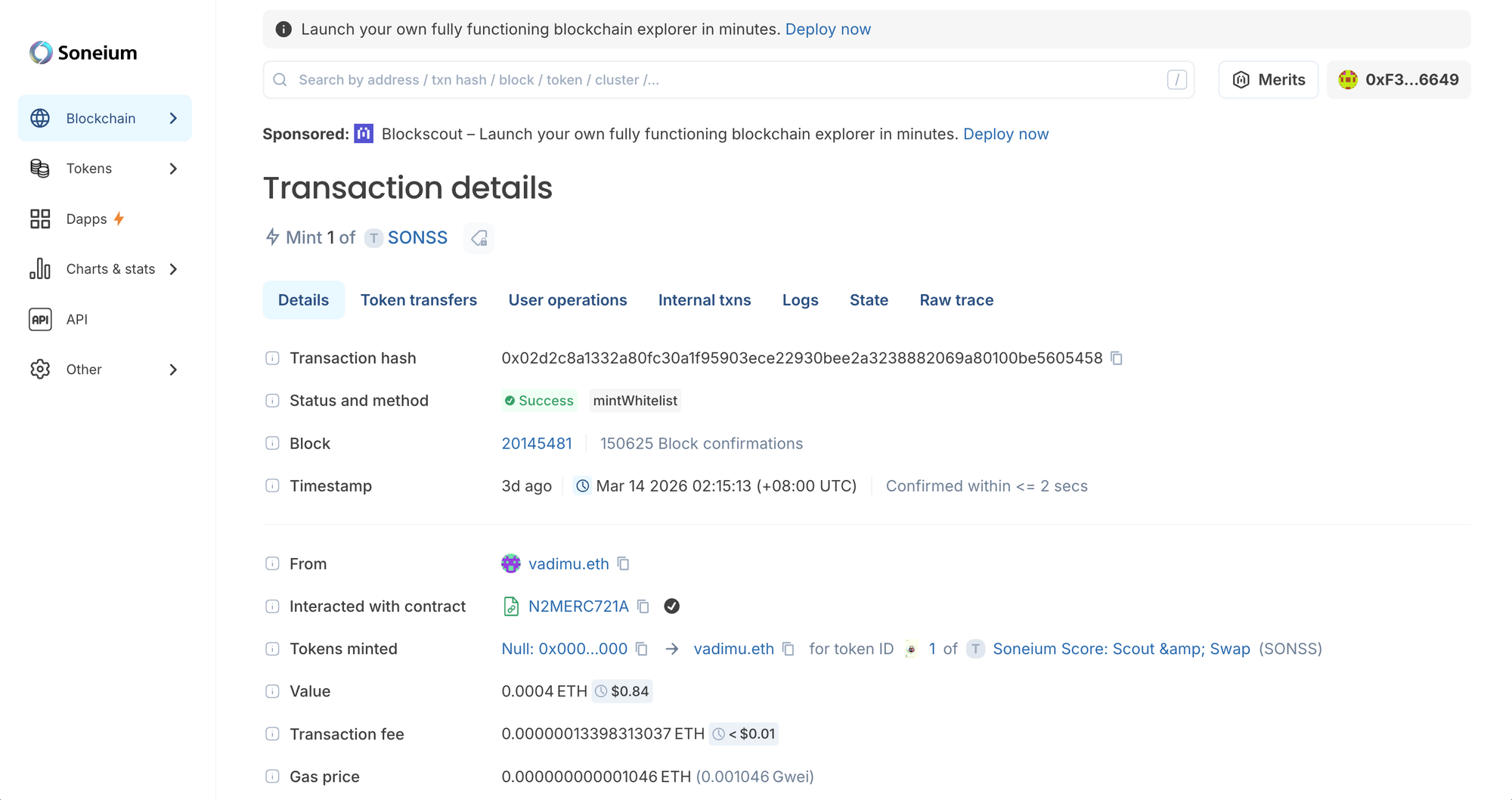
This transaction represents the mint of Token ID #1 from the Soneium Score: Scout & Swap (SONSS) collection, as part of their Soneium Score Season 8 campaign.
From this page we can already get a concise summary:
- Status: Success
- Method: mintWhitelist
- Contract: N2MERC721A
- Value: 0.0004 ETH
- Confirmation time: under 2 seconds
From this alone, we can confirm that the transaction executed correctly and interacted with the NFT contract as intended.
But the most important part is not the summary. It is what happened inside the transaction.
The moment of minting: “Tokens Minted”
Scroll down to the Tokens minted line.
You will see information that looks like this:
- From:
0x0000000000000000000000000000000000000000 - To:
vadimu.eth - Token ID:
1
This is the single most important signal in the entire transaction.
It tells you that a new NFT was created and assigned to a specific owner. Even if your wallet does not display it, this record is definitive.
To understand why, we need to unpack what this “from” address actually represents.
Why every NFT mint comes from 0x000…
The address 0x0000000000000000000000000000000000000000 is known as the null address, or zero address. It is not a real wallet. No one controls it, and it cannot initiate transactions.
Instead, it is used by convention to represent creation.
In the ERC-721 standard, every NFT mint emits a Transfer event with the following structure:
Transfer(address(0), recipient, tokenId)
This is not a transfer in the usual sense. It is a signal that a token did not previously exist, and has now been created and assigned to its first owner.
So when you see:
- From:
0x000… - To: your address
It means exactly one thing: The NFT was minted successfully by you.
Verifying it at a deeper level: the Logs tab
If you want to go deeper, open the Logs tab for the same transaction.
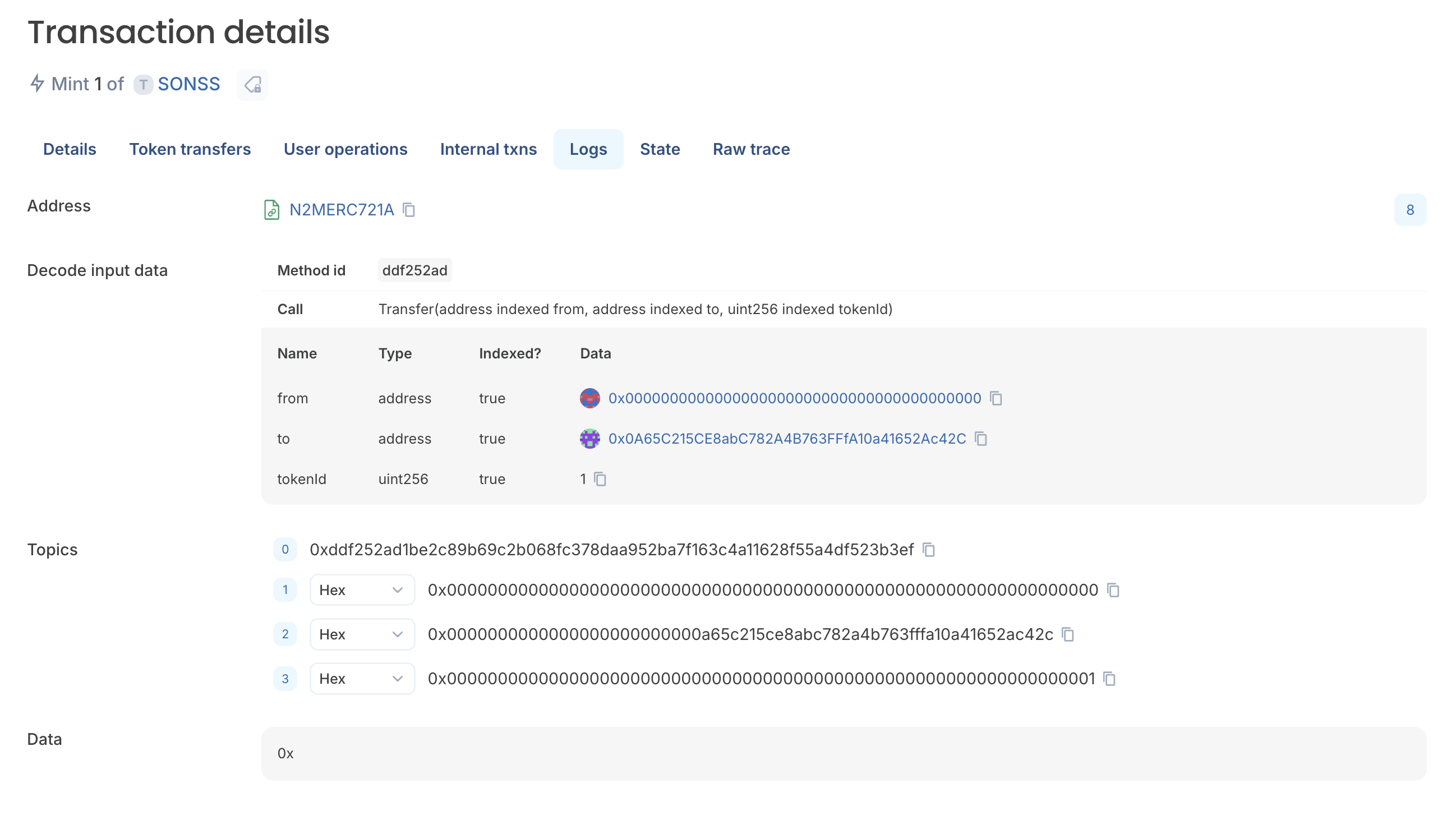
Here, Blockscout decodes the raw event emitted by the contract:
- Event:
Transfer(address indexed from, address indexed to, uint256 tokenId) - From:
0x0000000000000000000000000000000000000000 - To:
0x0A65C215CE8abC782A4B763FFfA10a41652Ac42C - Token ID:
1
You will also see the method ID ddf252ad, which corresponds to the standard ERC-721 Transfer event signature.
This is the canonical record of minting. It is not dependent on UI interpretation, metadata, or third-party indexing. It is emitted directly by the contract and stored permanently onchain.
At this level, there is no ambiguity. The token exists, and ownership has been assigned.
Token ID: the identity of the NFT
In this collection, Token ID #1 represents the very first NFT minted. As more users minted, the contract incremented the token ID:
Token ID #2→ second mintToken ID #3→ third mint- …
Each token ID is unique and permanent. It is not just a label, but the core identifier used by the contract to track ownership.
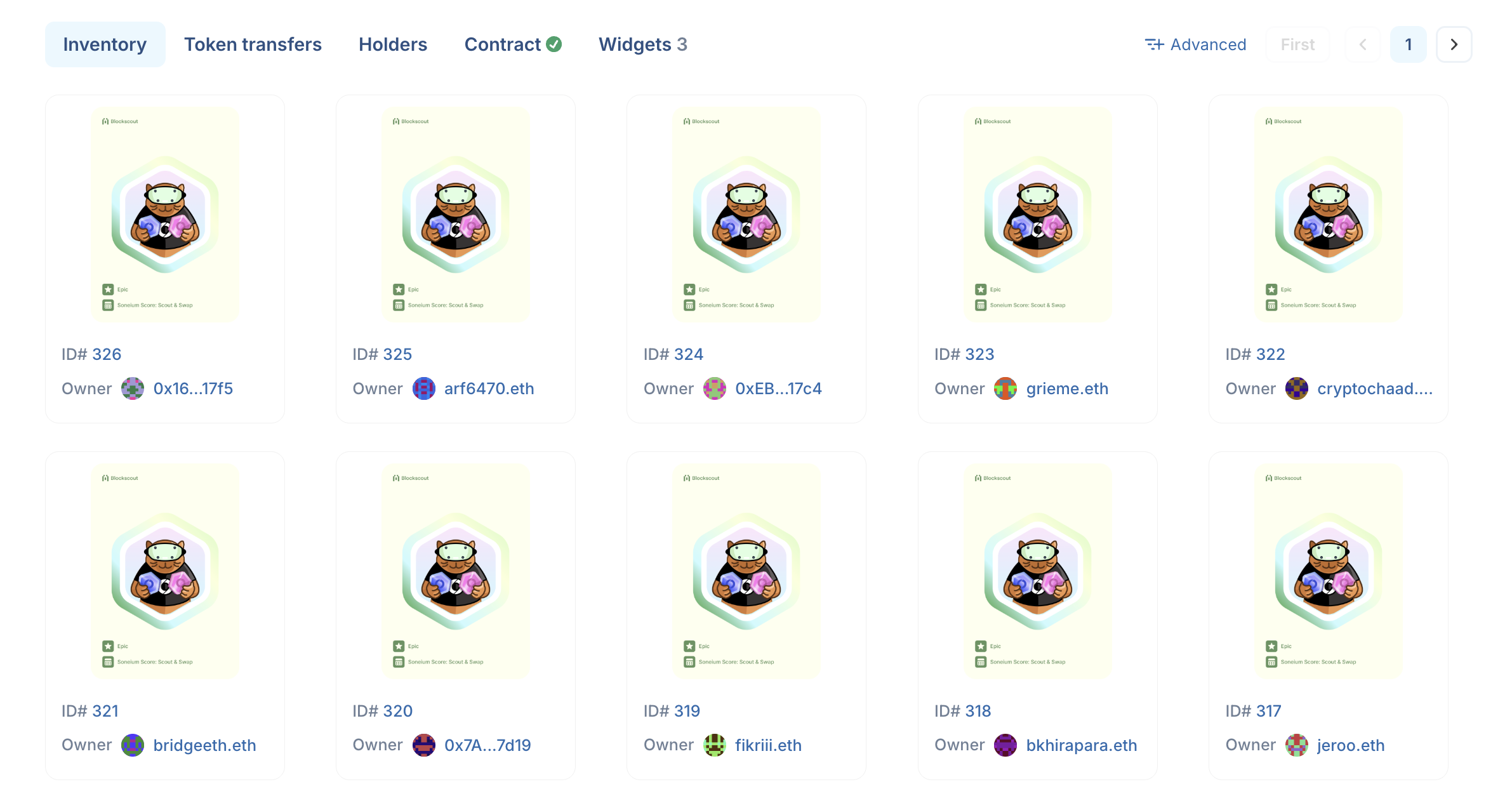
If you navigate to the NFT collection page, and scroll down to the Inventory section, you can see every token instance along with its current owner. This data is pulled directly from the contract’s internal state, not from a wallet or marketplace.
How ownership is assigned
When the mint transaction executes, the contract updates its internal mapping:
ownerOf(tokenId) → wallet address
For Token ID #1, this becomes:
ownerOf(1)→vadimu.eth
This mapping is what defines ownership. Wallets and marketplaces simply read from it.
This is why an NFT can exist and belong to you even if no interface is currently displaying it.
So why isn’t your NFT showing up?
Once you understand how minting works, the original problem becomes easier to diagnose. If the transaction succeeded and the mint event is present, the issue is not onchain. Common causes include:
Indexing delays
Many wallets and dashboards rely on background indexing. Newly minted NFTs may take time to appear.
Unsupported collections
Some interfaces only display recognized or verified collections. New deployments may not be included yet.
Metadata issues
NFT images and attributes are often stored offchain. If metadata fails to load, the NFT may appear blank or missing.
Wrong network
If you minted on Soneium but your wallet is set to the wrong network, the NFT will not appear.
UI filtering
Some tools hide unrecognized or low-signal NFTs to reduce spam, which can unintentionally hide legitimate assets.
 0xScout
Minting vs transferring: an important distinction
It’s also worth clarifying a common misconception. Minting is not the same as transferring.
A typical transfer looks like this:
- From:
User A - To:
User B
A mint looks like this:
- From:
0x000… - To:
User
There is no previous owner in a mint. The token is created and assigned in a single step. Understanding this distinction makes it much easier to read NFT activity on a block explorer.
 0xScout
What actually happened when you minted
If we reconstruct the process from the example transaction:
- You called the
mintWhitelistfunction on the NFT contract - The contract created a new token
- It assigned
Token ID #1 - It recorded
vadimu.ethas the owner - It emitted a Transfer event from the null address
Everything after that, including wallet display and marketplace visibility, is secondary.
The key takeaway
When an NFT does not show up, the instinct is to question the mint. But the mint is rarely the problem.
The blockchain already recorded the outcome.
If you can find:
- a successful transaction
- a Transfer event from
0x000… - a token ID assigned to your address
then your NFT exists, regardless of what any interface shows.
Block explorers make this visible. They remove guesswork and replace it with verifiable data.
It's all about the onchain record
Minting an NFT is not about receiving a file or image. It is about creating a new onchain asset, assigning it a unique identity, and recording ownership in a system that does not depend on any single interface.
Once you understand how to read that process, you no longer need to rely on wallets or dashboards to confirm what you own.
You can verify it yourself, directly from the source.
 Joe
Joe