
Blockchain 101: Checking a DeFi Swap Transaction on Blockscout
A quick walkthrough of reading any transaction on Blockscout: status, method, token transfers, and fees, using a real on-chain swap as the example.


TL;DR. Paste any transaction hash into Blockscout and you get five things at a glance: status, participants, method, token transfers, and fees. Here's how to read each one, using a live swap as the example.
What you'll need
- A transaction hash, or an address to browse its history.
- Any Blockscout instance (blockscout.com or a chain-specific one).
- Nothing else. No wallet, no API key needed for this.
Step 1: Paste the hash into search
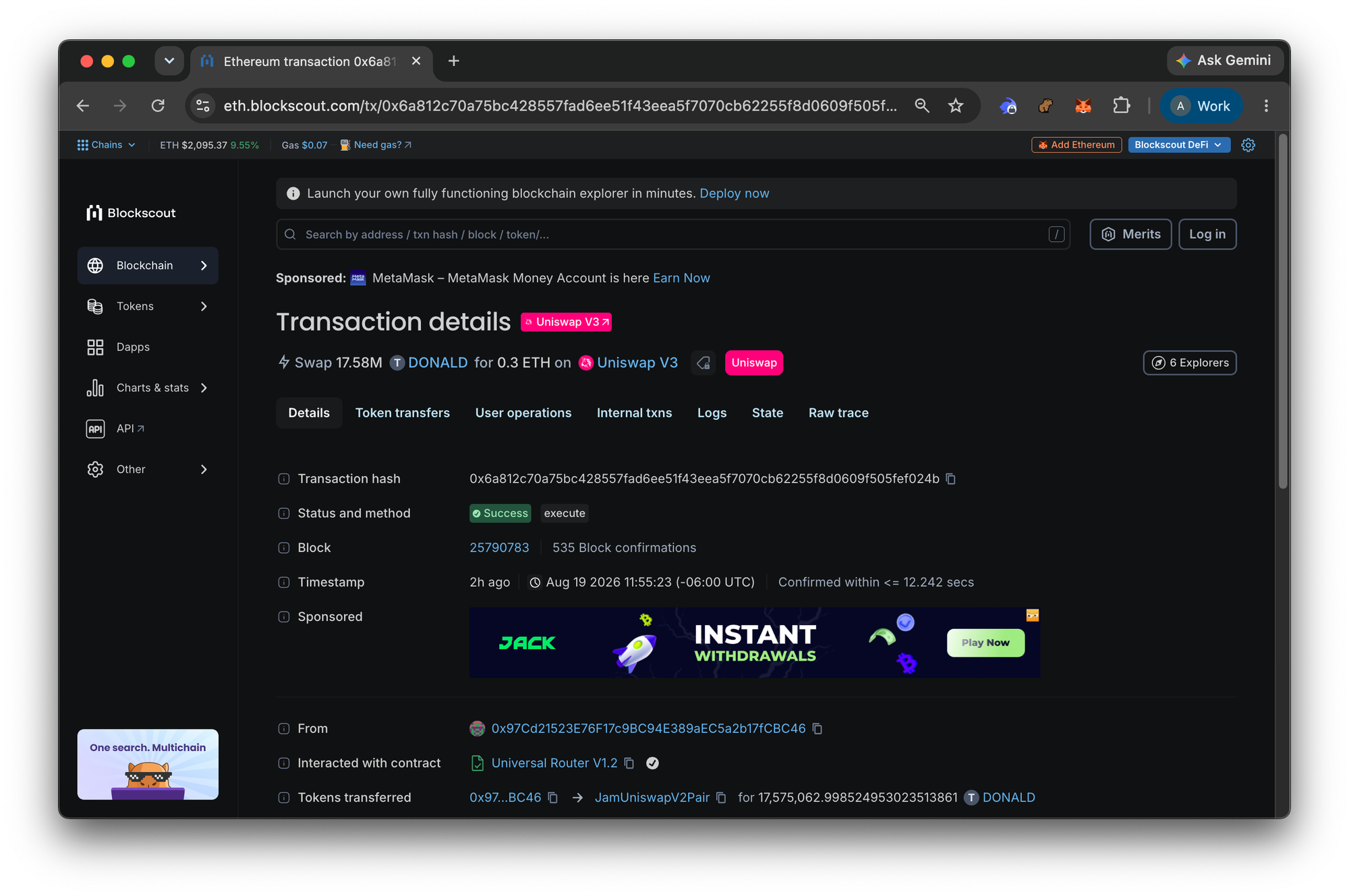
Grab a transaction hash and drop it into the search bar at the top of any Blockscout explorer. In this example we'll use a real one from Ethereum mainnet:
0x6a812c70a75bc428557fad6ee51f43eea5f7070cb62255f8d0609f505fef024bHit enter. The transaction detail page loads immediately, no indexing delay.
Here is the full link:
https://eth.blockscout.com/tx/0x6a812c70a75bc428557fad6ee51f43eea5f7070cb62255f8d0609f505fef024b
Step 2: Check status and participants
At the top of the page, three fields tell you the basics:
- Status: Success (a green badge; a failed transaction shows red and often a revert reason)
- From / To:
0x97Cd2152...fCBC46sent this transaction to a contract, Uniswap's Universal Router contract (0x3fC91A3a...B2b7FAD- the address can be viewed by mousing over the contract). - Block / Timestamp: block 25,790,783, mined August 19, 2026.
Step 3: Read the decoded method
Scroll down to the View Details, click and view Decoded Input Data. You will see the call data
execute(bytes commands, bytes[] inputs, uint256 deadline)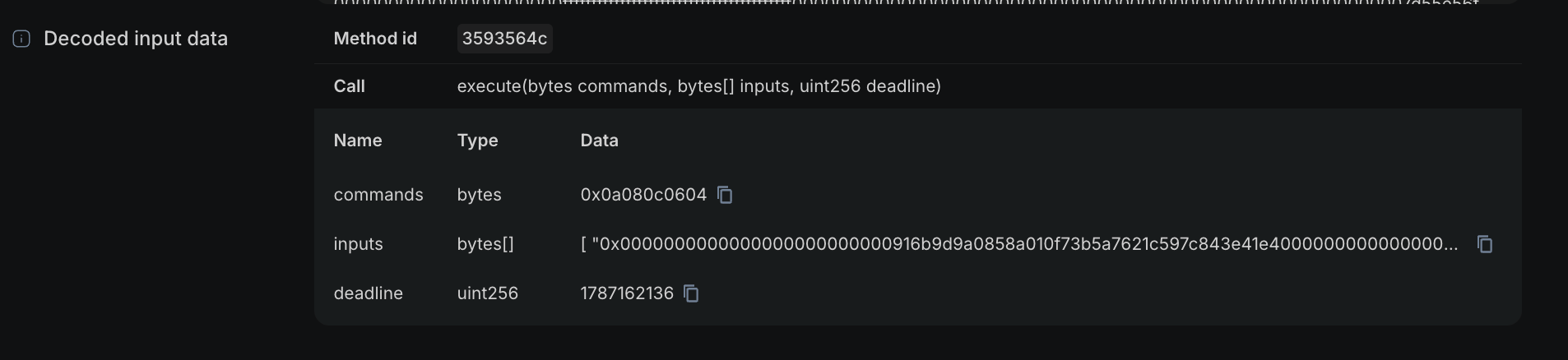
execute is the entry point for Uniswap's Universal Router: it batches several actions (swap, unwrap, transfer) into one call, encoded as a commands byte string. That's why the method name alone doesn't tell the whole story on router contracts, you need to view token transfers to see what actually happened.
Step 4: Follow the token transfers
The Token Transfers tab is where the real story lives.
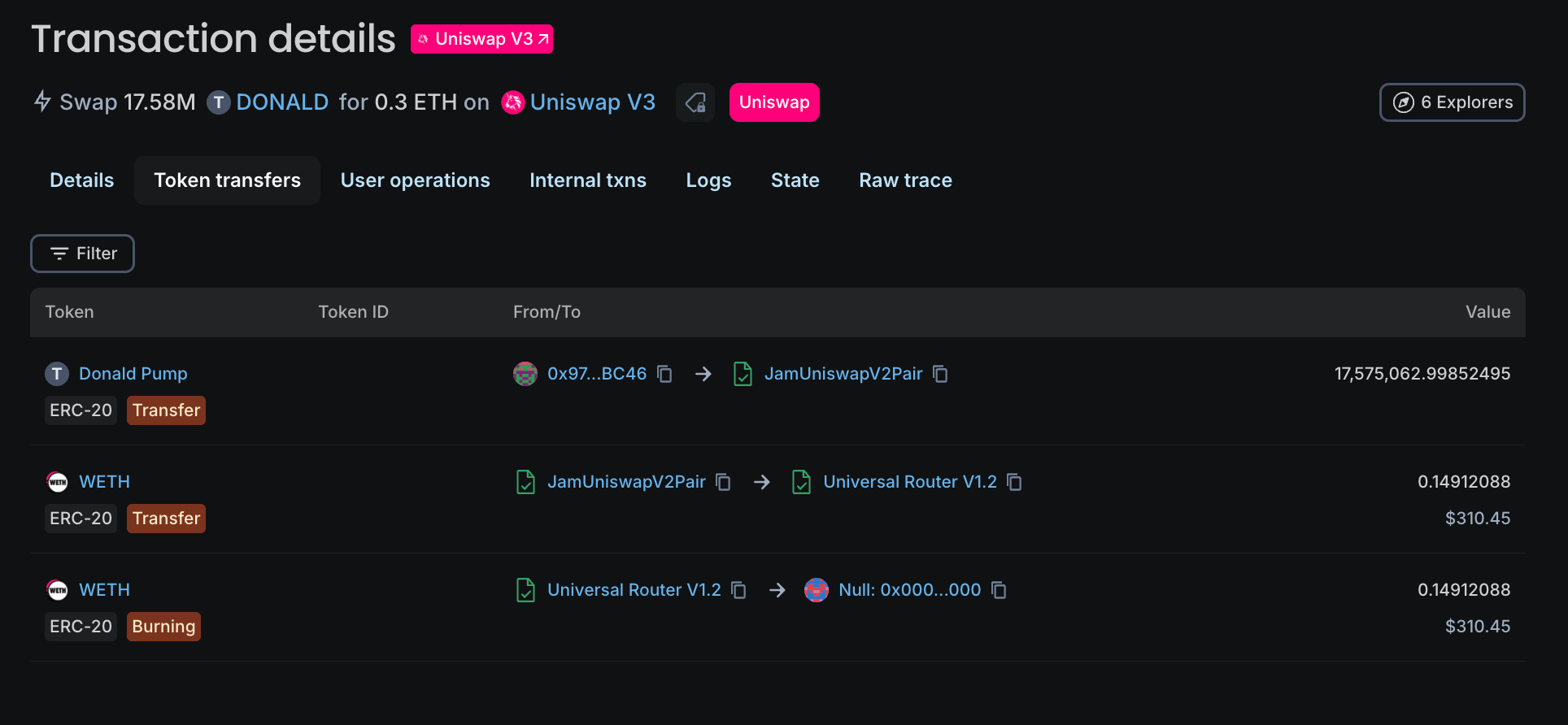
- The sender sent roughly 17.58 million DONALD tokens into the pool.
- The pool sent back 0.1491 WETH.
- That WETH was then unwrapped (Burned by sending to the Null 0x000... contract) and forwarded to the sender as native ETH.
These 3 line items were included in one swap. This is the fastest way to confirm what tokens a DeFi transaction actually moved, regardless of how many contracts it routed through internally.
Step 5: Check the fee
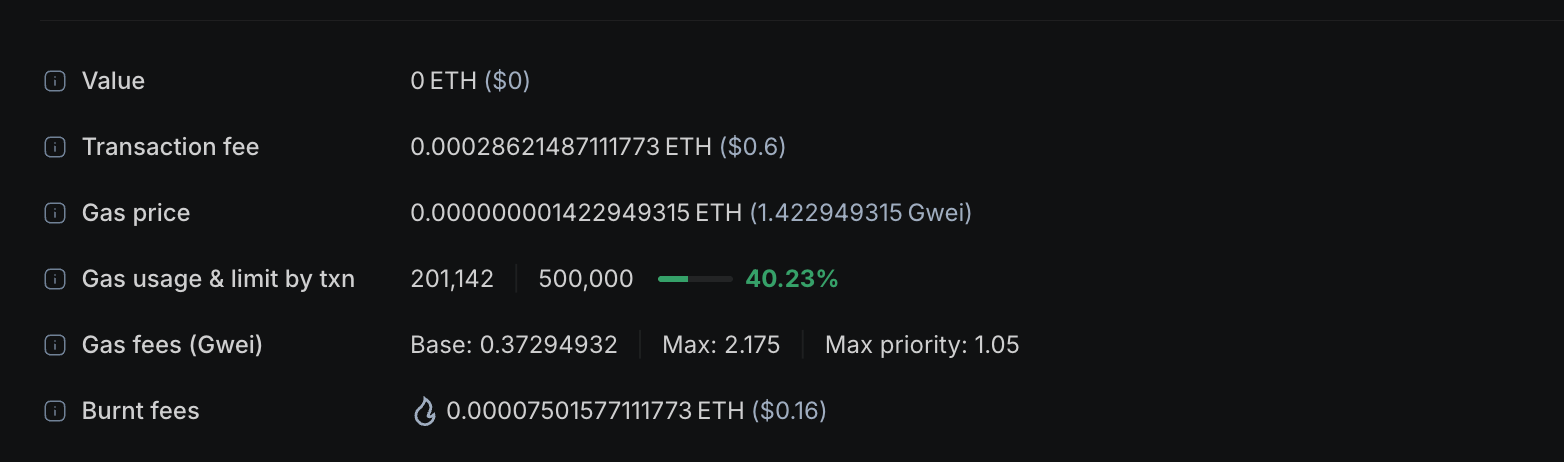
At the bottom, the Gas Fee section shows 201,142 gas used at a fee of roughly 0.000286 ETH, split into a base fee (burnt) and a priority fee (paid to the validator). Blockscout also shows the ETH/USD rate at the time, so you don't have to look it up separately.
Verify it worked
If you can answer these three questions from the page alone, you've read the transaction correctly: a) What contract was called, and how? b) What tokens moved, and between whom? c) What did it cost?
In the example above: a) Uniswap's Universal Router, b) DONALD-for-ETH swap, c) 0.000286 ETH ($.60) in fees.
Next steps
- New to the vocabulary? Start with the block explorer glossary.
- Still fuzzy on the basics? Read What Is a Block Explorer and Why It Matters.
- Pulling this data programmatically instead of by hand? The same fields are available with one API call.
curl -H "Authorization: Bearer <your-pro-api-key>" \
  "https://eth.blockscout.com/api/v2/transactions/0x6a812c70a75bc428557fad6ee51f43eea5f7070cb62255f8d0609f505fef024b"
Get a free Pro API key
Everything on this page is also available as JSON: status, decoded input, and token transfers together, in one call.